Building a smart vending machine with ID verification is less about adding an ID scanner to a cabinet and more about designing a transaction in which identification, payment and dispensing depend on each other in a predictable way. The scanner has to capture a supported credential, the verification layer has to return a usable result, the vending controller has to understand that result, and the machine has to remain in a safe state when any required part of the process fails.
That distinction matters. A barcode reader connected to a touchscreen is not automatically an age-verification vending machine. Neither is a camera that estimates age from someone's face. A production system needs a defined verification policy, reliable communication between modules, controlled payment and dispensing logic, privacy safeguards, diagnostics and a deployment plan that fits the rules of the market where the machine will operate.
For manufacturers and operators, the useful starting point is therefore not “Which scanner should I buy?” It is “What decision must this machine make before it is allowed to dispense a restricted product?” Once that question is clear, the rest of the architecture becomes much easier to design.
In practical terms: a smart vending machine with ID verification normally combines a document or digital-credential reader, verification software, an edge computer or control board, a payment terminal, a vending controller, dispensing hardware, network connectivity and a management system. The critical engineering work is in the interfaces and failure behavior between those components.
Start With the Transaction You Need to Control
Before choosing hardware, define the transaction from the machine's point of view.
For a normal snack vending machine, the logic is relatively simple: the customer selects an item, payment is authorized, the controller activates a motor or delivery mechanism, and the machine confirms whether the vend succeeded.
An age-gated transaction adds another authorization layer. The machine must decide whether the required identity or age check has been completed before the restricted product becomes eligible for dispensing.
That sounds obvious, but it affects almost every design decision. If payment happens first, what happens when the customer's ID cannot be verified afterward? If verification happens first, how long should the authorization remain valid while the customer browses products? Can one successful scan be reused for several purchases? What happens if the control board restarts halfway through the transaction?
These are not scanner questions. They are state-management questions, and they should be resolved before the physical machine is built.
The Core Architecture of a Smart ID-Verified Vending Machine
A practical machine can be divided into several functional layers. Some manufacturers combine several of them on one computer, while others keep payment, verification and vending controls physically separate.
| System Layer | Main Job | Typical Components |
|---|---|---|
| User interface | Guides the customer through selection, verification, payment and error recovery | Touchscreen, display controller, status lights, audio or visual prompts |
| Credential capture | Reads information from a supported physical or digital identity credential | 2D barcode reader, document camera, OCR/MRZ reader or compatible digital-ID interface |
| Verification engine | Applies document, age and optional identity checks | Local software, verification SDK, optional cloud service |
| Face capture | Provides an optional link between the credential portrait and presenter | Camera, controlled lighting, face-comparison software and optional liveness capability |
| Payment | Handles card or wallet transactions | EMV/contactless payment terminal and payment processor connection |
| Vending controller | Controls motors, locks, sensors and product release | Industrial control board, motor drivers, delivery sensors and I/O interfaces |
| Edge computer | Coordinates verification, UI, network services and transaction state | Industrial PC, ARM board or embedded computer |
| Telemetry | Reports machine health, inventory and operational events | Local logs, cloud dashboard, modem, Ethernet or Wi-Fi module |
The architecture does not require every machine to use every feature. A project that only needs document-based age verification may not need face comparison. A machine working with a locally processed credential may not need a cloud verification call for every transaction.
The important part is that every included module has a clear purpose.
Design the Transaction as a State Machine
One of the most useful ways to design the software is to treat the entire customer session as a state machine rather than a collection of screens.
A typical transaction might begin in an idle state. The customer selects a restricted product, which moves the system into an age-verification-required state. The machine asks for a credential and waits for a capture result.
A successful capture does not necessarily mean the sale is approved. The credential data may first need to be parsed, the date of birth evaluated, document checks completed and any optional face-related step performed.
Only after all required verification conditions have been satisfied should the system create an internal authorization that allows the transaction to proceed to payment.
Payment authorization is another state. A successful card authorization should still not directly energize a vending motor. The controller should confirm that the age authorization remains valid, the selected product is still available, the delivery channel is ready and no safety or service condition is active.
After dispensing, the machine should use a delivery sensor or other feedback mechanism where available to determine whether the vend actually completed. If it did not, payment handling and customer messaging need a defined recovery process.
A useful design rule: no individual module should be able to accidentally turn an unresolved transaction into permission to dispense a restricted product.
Choose the ID Reader Around the Credentials You Need to Support
The phrase “ID scanner” covers several different devices.
For U.S. driver's licenses and identification cards, machine-readable 2D barcode data is commonly important. AAMVA's current DL/ID Card Design Standard addresses machine-readable data and a range of card technologies, but the exact credential support still depends on the issuing jurisdiction, scanner and software.
A dedicated barcode reader can be compact and fast when the application primarily needs encoded data. A document-imaging system can capture more of the card and may support optical analysis. Passport-oriented readers may also need OCR or machine-readable-zone support.
Do not select a reader because the specification says “supports all IDs.” Ask for the actual supported-document list and identify which function is used for each document family.
If the target market has international customers, decide whether the machine needs passports, foreign driving licences or only domestic credentials. Supporting more document families increases testing and maintenance requirements, so broad compatibility should be intentional rather than assumed.
Separate Data Reading From Document Authentication
A successful barcode read should not be described as proof that an ID is genuine.
The scanner may decode a name, date of birth, expiration information, issuing jurisdiction and other supported data fields. That is useful for age calculation and data-consistency checks, but a copied or altered credential may still contain machine-readable information.
Document-authentication systems can add other checks. Depending on the selected hardware and software, these may include comparison between printed and encoded information, document-template analysis or evaluation of supported optical features.
Hardware claims need to be specific. If a supplier says the reader checks ultraviolet features, the device needs the appropriate illumination and imaging capability. The same principle applies to infrared imaging, hologram analysis or other document-security claims.
A better specification does not say “fake ID detection included.” It says which signals the system evaluates, which documents were tested, how uncertain results are handled and what the application receives from the verification engine.
Age Calculation Should Be Its Own Rule Layer
Once a trustworthy date of birth has been obtained from the accepted verification workflow, age calculation is straightforward, but it should still be implemented carefully.
Use the complete date rather than subtracting the birth year from the current year. The configured minimum age should be stored as a rule rather than scattered through the user-interface code.
This becomes important when a platform is sold into multiple markets or handles multiple product categories. The control layer should be able to apply the appropriate rule without requiring the manufacturer to rebuild the entire application for every configuration.
Expiration handling should also be configurable according to the requirements of the intended use. Do not assume one rule regarding expired credentials applies everywhere.
The software should record which policy version made the transaction decision. If a rule changes later, operators can then distinguish transactions made under the previous configuration from transactions made under the new one.
Face Comparison Is an Optional Verification Layer
Face comparison is often added when the project needs a stronger connection between the credential and the person presenting it.
The camera captures a facial image and the matching engine compares it with the portrait associated with the ID. The result is generally a similarity score evaluated against a configured threshold rather than an absolute statement that two faces are identical.
That means camera placement is an engineering issue. A high-resolution camera mounted too low, pointed upward or exposed to strong backlighting can perform worse than a modest camera installed in a controlled capture position.
NIST's continuing face-recognition evaluations show why this matters: false non-match performance is strongly influenced by image quality, and problems such as poor lighting and unsuitable camera angles can increase errors.
For a vending design, give the camera predictable lighting and a reasonable range of customer heights. Avoid placing it beside bright advertising LEDs, reflective glass or a display that constantly changes the light falling on the customer's face.
Liveness or presentation-attack detection should be specified separately. A face-match function does not automatically prove that the camera is viewing a live person rather than a photograph or another presentation.
Do Not Make Biometrics the Default Just Because the Hardware Supports Them
It is tempting to add every available verification feature to a smart machine. That can create unnecessary complexity.
Face-related processing introduces more privacy questions than a simple age calculation. The project has to determine what image is captured, whether it is transmitted, whether a reusable biometric template is produced, how long anything is retained and what notice or other requirements apply in the destination jurisdiction.
If a particular use case can meet its legitimate objective without retaining facial data, there is little reason to create a permanent facial database simply because the camera can produce one.
For the same reason, a machine should not automatically upload complete ID images to a remote dashboard. Collect what the transaction actually needs and design the data flow around that purpose.
Plan for Mobile Driver's Licenses Rather Than Rebuilding Later
Physical credentials will remain important, but mobile driver's licenses are becoming part of the identity ecosystem.
AAMVA released Mobile Driver's License Implementation Guidelines Version 1.6 in 2026, with an emphasis on interoperability, trust and privacy-preserving implementation. mDL systems based on applicable standards work differently from taking a photograph of a physical card displayed on a phone.
If a machine is expected to remain in service for several years, it makes sense to keep the identity layer modular. The vending controller should not care whether the eventual age authorization came from a physical-document reader or a supported digital credential. It should receive a normalized verification result from the identity subsystem.
This is a good example of why tightly coupling scanner-specific code directly to motor-control firmware creates problems later. A modular interface gives the manufacturer room to add new credential methods without redesigning the dispensing system.
Keep the Edge Computer and Vending Controller Responsibilities Clear
A smart vending machine often contains more computing power than a traditional vending controller needs.
The edge computer can manage the touchscreen, ID-verification SDK, network services, camera and cloud communication. The vending controller can remain focused on product motors, locks, sensors and machine-level I/O.
This separation has practical advantages. A user-interface application can restart without directly resetting every motor controller. A verification-software update can be deployed without rewriting the low-level motor firmware. Safety-critical dispensing logic can also remain isolated from unnecessary internet-facing services.
The two systems still need a reliable protocol between them. Define explicit messages such as verification approved, authorization expired, product selected, payment authorized, vend requested, vend confirmed and transaction cancelled.
A generic “OK” flag is usually too ambiguous for a system that has to recover from failures.
Integrating With the Vending Controller
Existing vending systems may use established vending interfaces, serial protocols or manufacturer-specific control APIs. New machines may use a custom controller connected directly to the edge computer.
Whichever approach is used, keep identity data away from the low-level vending bus unless there is a real reason for it to be there.
The motor controller normally does not need the customer's name, date of birth, ID number or facial image. It needs to know whether the current transaction is authorized to dispense the selected restricted product.
A compact authorization message can significantly reduce the number of places where personal data appears inside the machine.
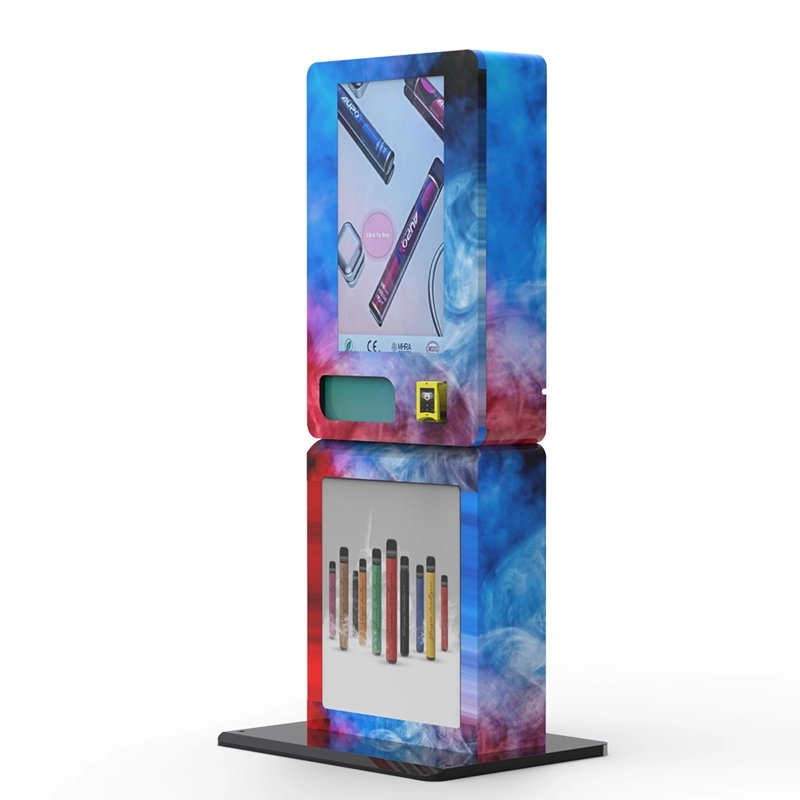
For manufacturers evaluating complete configurations, our ID scan vending machine shows one example of integrating the verification layer into the vending cabinet rather than treating it as an unrelated external terminal.
Payment Should Be Designed as a Separate Security Domain
A smart machine usually needs card and contactless payment, but the vending application should avoid handling raw payment credentials unnecessarily.
Using an appropriate payment terminal and processor integration can keep much of the sensitive card-data handling inside the payment ecosystem rather than routing it through the same application that processes ID images and vending telemetry.
PCI DSS v4.0.1 remains the currently published PCI Data Security Standard as of this article's review date. The exact PCI scope of a deployment depends on the payment architecture, service providers and how cardholder data flows through the system.
From a system-design perspective, the clean approach is to keep three decisions distinct:
Is this customer authorized for the restricted transaction?
Has the required payment been authorized?
Did the machine successfully deliver the product?
Do not treat any one of those events as proof that the other two occurred.
Think Carefully About Verification Before or After Payment
There are two common transaction sequences.
One verifies eligibility before asking the customer to pay. This avoids authorizing a payment that later needs to be reversed because the ID check failed.
The other may begin parts of the payment process while verification is running in order to reduce total customer waiting time. That can work, but the implementation must distinguish initialization from final authorization and make failure recovery clear.
For a new build, keeping the restricted product locked behind a successful verification state before final payment authorization is usually easier to reason about.
Whatever sequence you choose, test it with interruptions. Disconnect the ID reader during payment. Restart the interface after verification. Remove network connectivity during authorization. Simulate a payment timeout. The machine should always recover to a known state rather than inheriting approval from an incomplete previous transaction.
Local Verification and Cloud Verification Have Different Tradeoffs
Not every verification function needs to run in the cloud.
Document capture, barcode parsing, exact age calculation and some image-processing functions can be performed locally depending on the selected solution. Other identity services may rely on remote APIs or external data sources.
Local processing can reduce latency and allow certain functions to continue during a network outage. It can also reduce the amount of sensitive information that leaves the machine.
Cloud services can provide centralized configuration, specialized verification functions and easier software management, but they introduce connectivity, service-availability and data-transfer questions.
A useful architecture documents each verification step as local, remote or optional. The system can then make a deliberate decision when the network is unavailable instead of simply assuming that “offline mode” means every check is skipped.
Define Fail-Safe Behavior Before You Write the Happy Path
Most demonstrations show a clean ID, strong internet connection, successful payment and perfect vend. Real deployments spend plenty of time outside that ideal path.
The ID reader can disconnect. The camera can fail. A cloud API can time out. A customer's card can be damaged. A motor can jam. The payment processor can approve a transaction while the vending mechanism subsequently fails.
The machine needs a response for each condition.
If a required identity check cannot be completed, restricted dispensing should remain unavailable. If payment succeeds but the product does not vend, the payment recovery process should follow the payment provider's supported flow. If the controller loses communication with the verification application, it should not assume the last approval remains valid indefinitely.
Authorization should normally be transaction-specific and time-limited rather than a global machine flag that remains on until somebody resets it.
Power Loss Is Part of the Transaction Model
Power failure creates another class of edge cases.
Imagine that verification has succeeded and payment has been authorized, but power disappears just before the vending motor turns. When the machine restarts, it needs enough transaction information to determine whether the customer was charged, whether the product was delivered and whether any previous age authorization should still be considered valid.
Persist only the operational state you actually need, and do not restore a stale verification authorization after a reboot simply because it was stored before the outage.
For unattended installations, a controlled shutdown mechanism, surge protection and appropriate power design can improve reliability, but software recovery logic is still necessary.
Build Privacy Into the Architecture
ID verification introduces personal information into a machine that historically only needed product and payment data.
The simplest privacy improvement is to avoid spreading identity data throughout the system.
The document-reading service can extract the information necessary for the verification decision. The rest of the vending application can receive a minimal result such as age requirement satisfied, verification method, timestamp and an operational reference identifier.
The inventory service does not need the customer's address. The motor controller does not need a driver's-license number. The cloud dashboard does not automatically need a facial photograph.
If raw ID or facial images are temporarily required for a verification function, define where they exist, how long they remain in memory or storage, whether they leave the machine and how deletion is enforced.
Data minimization does not automatically make a system legally compliant, but it can reduce unnecessary exposure and make the privacy architecture easier to explain.
Secure the Machine Like an Internet-Connected Computer
A smart vending machine is an endpoint with physical access available to the public. That combination deserves more attention than a normal office computer.
Service interfaces should not be exposed through default passwords. Remote administrative access should use strong authentication. Software and firmware updates should come from a controlled source, and signed update packages are preferable where the platform supports them.
Separate customer-facing applications from administrative functions. A touchscreen escape into the operating system should not reveal system settings or stored files.
Use encrypted network transport for remote services and avoid hard-coding long-lived API secrets directly in application files that service personnel can easily copy.
Physical service ports also deserve attention. A USB port or maintenance connector that is convenient in the factory can become a security problem if it remains accessible from outside the locked service area.
The Mechanical Design Affects Verification Reliability
The electronics can be excellent while the enclosure makes them difficult to use.
ID readers need a predictable presentation position. Camera-based systems need controlled lighting and a sensible capture distance. Touchscreens need to remain readable under the venue's lighting conditions.
Bars and entertainment venues are especially challenging because of dim light, moving colored light and reflective surfaces. A small dedicated light around the document area can be more valuable than increasing the camera's megapixel count.
The scanner should also be protected from spills, dust and impact without making it difficult to clean.
Do not hide serviceability in the design process. Readers, cameras, payment terminals, power supplies and controllers are replaceable modules. A technician should be able to reach them without dismantling the product shelves or removing the complete machine from its location.
Wall-Mounted and Freestanding Machines Need Different Engineering Decisions
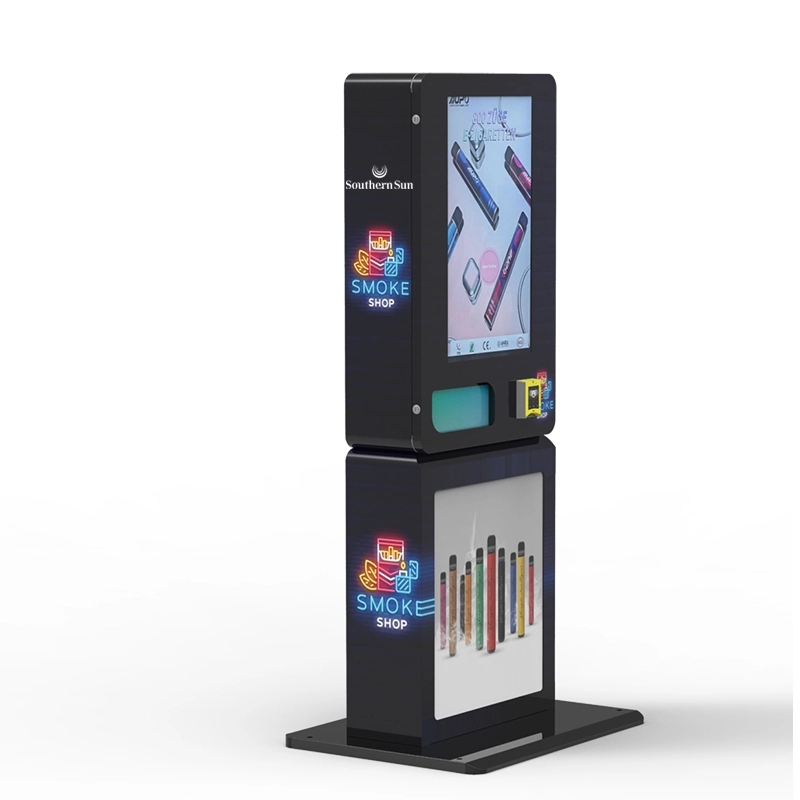
A wall-mounted machine places hard limits on depth, product capacity, cooling space and service access. That may favor a compact camera or reader and a simplified dispensing layout.
A freestanding cabinet gives the designer more room for separate electronics compartments, larger product capacity and easier component access, but it introduces different stability, transport and placement considerations.
The best form factor is therefore not determined by the verification technology alone.
Our wall-mounted compact vending machine provides a reference for projects where space is limited, while the broader vending machine range shows larger cabinet approaches.
The deployment environment should determine the final layout rather than forcing every application into the same enclosure.
Design the User Interface Around Recovery, Not Just Success
A customer normally spends only a short time in front of a vending machine. The interface should make the next action obvious.
During ID capture, show where the credential should be placed and whether the customer needs to present the front, back or another document area. If the image is blurred or the barcode cannot be read, ask for a retry rather than displaying an unexplained error code.
If a credential is unsupported, say so. If the verification service is temporarily unavailable, distinguish that situation from an age failure. Those are different events from the customer's perspective and from the operator's perspective.
Do not reveal unnecessary fraud-detection details in customer error messages. The interface can explain what the customer can do next without describing the internal thresholds used by the verification engine.
Accessibility also matters. Touch targets, screen height, text size, contrast and camera positioning should be considered during physical design rather than added after the cabinet is already manufactured.
Telemetry Should Focus on Machine Health
Remote management is one of the features that turns a connected vending machine into a useful fleet asset.
The dashboard can monitor inventory, door status, payment-terminal state, network connectivity, software version, reader availability, motor errors and verification failure categories without becoming a warehouse of customer identity information.
Useful metrics include how often a reader fails to capture a credential, how many transactions time out, which machines repeatedly lose connectivity and whether a particular software release is producing more operational errors.
These metrics can identify a failing reader or poor installation environment without requiring the operator to view the IDs of individual customers.
Keep commercial analytics separate from personal identity whenever possible.
Do Not Build Around a Permanent Government Database Assumption
A common mistake in product descriptions is to say that every scanned ID is checked against a national or government database.
Real identity-data verification services have coverage, authorization, contractual and technical conditions. Availability may vary by jurisdiction and use case.
The machine architecture should therefore treat external data verification as a defined service integration rather than a universal property of the scanner.
If such a service is required, document which provider supplies it, which credentials are covered, which fields are transmitted, what response is returned and what happens when the service cannot answer.
That produces a much more maintainable design than hard-coding an assumption that every credential can be queried in real time.
U.S. Tobacco and Vape Projects Have a Location Constraint
Important: an ID-verification system does not by itself make an e-cigarette or tobacco vending machine lawful at a particular U.S. location.
Under current U.S. FDA rules, tobacco products including e-cigarettes may not be sold to anyone younger than 21. Retailers are also required to check photographic identification for customers under 30 who attempt to purchase tobacco products.
For vending machines, there is an additional federal restriction: tobacco products may not be sold with the assistance of a vending machine in facilities where people under 21 are present or are permitted to enter at any time.
That means the venue should be reviewed before engineering effort is spent trying to make the ID system more sophisticated. A machine equipped with barcode reading, document authentication, face comparison and liveness still cannot override a location restriction.
State, local and tribal requirements can add further rules. Other age-restricted product categories can have different requirements entirely. Build the technical system around a defined market rather than advertising one configuration as universally compliant.
Create a Real Test Matrix Before Production
Testing one clean ID under factory lighting is not enough.
A useful verification test matrix covers the actual credential families expected in the target deployment. Include ordinary wear, different card orientations where applicable and realistic lighting conditions. Document which credentials are officially supported rather than using unsupported documents as proof of a scanner defect.
Test the transaction system as well as the scanner.
Disconnect the reader during a transaction. Remove the network. Restart the edge computer while leaving the vending controller powered. Restart the vending controller while the user interface remains active. Simulate a verification timeout. Cancel payment after verification. Authorize payment and then simulate a failed vend.
Check what happens when the service door opens, when a product becomes unavailable after selection, and when a machine returns from a power outage.
The objective is not simply to make every test “pass.” It is to confirm that the system returns to a predictable state and never interprets uncertainty as authorization.
Test Face Capture in the Actual Cabinet
A face-matching SDK tested on a laptop should not be treated as proof that the final vending installation will perform the same way.
Test with the production camera, production lens, production screen brightness and production enclosure. If the machine is intended for dim venues, reproduce those conditions.
Check whether very tall and short users remain within the useful capture zone. Look at strong backlighting and side lighting. Make sure advertising animations on the display do not create unpredictable illumination during capture.
If the system uses a quality threshold, make sure low-quality images cause a recapture rather than automatically becoming a negative identity decision.
Separate Factory Acceptance Testing From Site Acceptance Testing
A machine can pass every factory test and still perform poorly after installation.
Factory acceptance testing should confirm the agreed hardware configuration, reader operation, payment integration, controller behavior, network interfaces, dispensing channels, software version and failure handling.
Site acceptance testing should confirm the environment.
That includes power, connectivity, camera and scanner lighting, customer access, machine stability, payment communication and the actual credentials expected at that location.
For a fleet, use the same acceptance form for every machine. It gives the operator a baseline when troubleshooting future differences between locations.
Plan Software Updates Before the First Machine Ships
Identity and payment systems are not static. Credential standards evolve, operating systems receive security updates, verification providers change APIs and remote services change certificates or endpoints.
A production machine needs an update strategy.
That strategy should answer who is allowed to publish an update, how packages are authenticated, whether machines can be updated remotely, whether deployments can be staged across a small group first, what happens if installation fails and whether rollback is possible.
Do not assume every component should update itself independently. A payment terminal, verification SDK and edge operating system changing at the same time can make troubleshooting unnecessarily difficult.
Track deployed versions by machine identifier so the service team knows exactly what software is running at each site.
Maintenance Should Be Based on Condition and Error Data
There is no useful universal rule saying every scanner must be replaced after a fixed number of scans.
Different reader designs have different wear mechanisms. Some have moving card-contact components; others rely primarily on cameras and lighting. Their service intervals depend on hardware design and environment.
A better maintenance program combines routine cleaning with operational telemetry. If one machine suddenly produces more capture failures than comparable machines, inspect it. If illumination becomes uneven, check the lighting system. If a reader disconnects intermittently, investigate the cable and power path before replacing the complete module.
Keep critical spare parts for a fleet, especially modules that can take a machine out of service completely. Modular construction makes this easier.
Build Versus Buy: Decide Which Layer Is Really Your Product
Not every business should engineer the entire vending system from individual components.
If your competitive advantage is software, it may make more sense to start with a proven vending platform and integrate your verification application. If you manufacture cabinets and control systems, you may prefer to integrate a third-party ID-verification SDK rather than build document-recognition technology from scratch.
A complete custom build makes sense when the project requires a unique cabinet, unusual dispensing method, specialized credential workflow or large production volume that justifies the engineering investment.
For many operators, working with an established vending manufacturer reduces mechanical and control-system risk while leaving room to customize branding, product layout, verification software and remote-management features.
When evaluating an OEM or ODM supplier, ask for the architecture rather than just a feature list. You should be able to understand which company supports the scanner, payment terminal, verification engine, vending controller and cloud platform.
Budget by Subsystem Instead of Guessing One Machine Price
The cost of building a smart vending machine varies too much for a single generic number to be useful.
A realistic budget separates the cabinet and dispensing system from the ID reader, camera, edge computer, touchscreen, payment terminal, networking hardware, software integration, verification-service charges, certifications, testing, freight and after-sales support.
Recurring costs deserve their own line. These can include cellular service, cloud management, verification API usage, payment processing, software support and field maintenance.
Custom engineering should also be identified separately from unit manufacturing cost. The first machine in a new design absorbs work that later production units may not.
This makes quotation comparisons much more meaningful. A low unit price is not necessarily cheaper if important software, payment or support functions have simply been left out.
Common Design Mistakes
One common mistake is letting the ID scanner communicate directly with the vending motor logic without a proper transaction layer. That can make exception handling difficult and tightly couples two systems that evolve at different speeds.
Another is collecting every field from the credential because the scanner exposes it. More data creates more privacy and security responsibility without necessarily improving age verification.
Some machines are built around perfect connectivity and have no defined behavior when the cloud disappears. Others go too far in the opposite direction and silently skip external verification whenever the network is unavailable.
Mechanical placement is another frequent problem. A scanner that is technically supported but mounted beside glare, too low for normal use or behind a difficult-to-clean window will produce unnecessary failures.
Finally, avoid building the entire business model around a compliance claim made by a component supplier. A scanner can provide a technical capability. The legality of the complete sale depends on the product, jurisdiction, location and operating process.
A Sensible Commissioning Sequence
Before deploying a new machine, confirm the final hardware configuration and software versions. Verify that the reader is the model specified in the project documentation and that the payment terminal has been configured for the intended processor.
Load only the products approved for the deployment and verify that restricted product categories cannot be reassigned accidentally to unrestricted vending channels.
Run verification tests with supported credentials. Test failed and unreadable credentials. Check the behavior of the face step if one is enabled. Disconnect connectivity and confirm that the machine follows the documented offline rule.
Complete a payment and confirm successful dispensing. Then test a failed vend so the payment-recovery path is understood.
Finally, verify remote monitoring, service credentials, clock synchronization and software version reporting before the machine is handed over to normal operation.
Design the System So It Can Evolve
The strongest architecture is not necessarily the one with the most hardware. It is the one that keeps the boundaries between functions clear.
The identity layer should be able to evolve from physical IDs to additional supported digital credentials. The payment terminal should be replaceable without rewriting the document reader. The vending controller should be able to change motors or cabinet layouts without knowing how facial comparison works.
That modularity also improves troubleshooting. When a transaction fails, logs can show whether the cause came from credential capture, verification, payment, controller communication or the dispensing mechanism.
A tightly coupled machine can make all five problems look like the same generic “transaction failed” error.
Frequently Asked Questions
What components are needed to build a smart vending machine with ID verification?
A typical system includes a touchscreen or customer interface, credential reader, verification software, embedded computer, vending controller, payment terminal, dispensing hardware, network connection and remote-management system. Face comparison or liveness may be added when the use case requires them, but they are not automatically necessary for every machine.
Can I add an ID scanner to an existing vending machine?
Possibly, but the important issue is controller integration. The scanner's result has to become part of the transaction authorization rather than operating as an unrelated accessory. Older controllers may need an interface module or software changes. A retrofit should also define what happens when the scanner is disconnected, unavailable or returns an unresolved result.
Does reading a driver's-license barcode prove the ID is genuine?
No. Reading machine-readable data means the system successfully decoded the presented data. Document authentication can require additional checks depending on the credential, scanner and verification software. Barcode reading, document authentication, issuing-source verification and face comparison should be treated as separate functions.
Does a smart vending machine need facial recognition?
Not necessarily. Face comparison may be useful when the deployment requires a stronger connection between the credential and the presenter, but it introduces additional camera, privacy and operational requirements. The necessary verification method should be selected for the actual use case and jurisdiction rather than added by default.
Is liveness detection the same as face matching?
No. Face matching compares facial images. Liveness or presentation-attack detection addresses whether the system is interacting with a live person rather than a photograph, screen or other presentation. A supplier should state clearly whether either or both functions are included.
Can ID verification run without an internet connection?
Some functions can operate locally, including certain credential-reading and age-calculation tasks. Other checks can depend on an online verification service. The machine should document which steps require connectivity and follow a defined fail-safe policy if a required online service is unavailable.
Should ID verification happen before payment?
For many new designs, completing the required eligibility check before final payment authorization simplifies failure handling. Other architectures can overlap portions of verification and payment to reduce transaction time. Whichever sequence is used, dispensing should require both a valid verification state and successful payment authorization.
What should the machine do if the ID reader fails?
If the reader is required for the restricted transaction, the system should not treat hardware failure as approval. Restricted dispensing should remain unavailable, the customer should receive a useful service message and the operator should receive enough diagnostic information to identify the fault.
How much ID data should the machine store?
Only the information required for the defined operational and legal purpose should be retained. The inventory system and vending controller generally do not need full ID images or document numbers. Raw identity and biometric information can create additional privacy and security exposure, so retention should be deliberately designed rather than enabled by default.
Can a smart vending machine support mobile driver's licenses?
Potentially. Mobile driver's-license ecosystems are developing, and AAMVA's 2026 mDL Implementation Guidelines address interoperability, trust and privacy-preserving implementation. A modular identity layer makes future mDL support easier because the vending controller can consume a normalized verification decision rather than being tied directly to one physical scanner.
Does installing ID verification make a vape vending machine legal in the United States?
No. The equipment only addresses part of the sales process. Under current FDA rules, tobacco products including e-cigarettes cannot be sold to people under 21, and tobacco vending machines may not be used in facilities where individuals under 21 are present or permitted to enter at any time. State, local and tribal requirements may add additional restrictions.
What should be tested before deploying the machine?
Test supported credentials, failed and unreadable scans, network loss, verification timeouts, payment failures, failed vends, controller restarts, power interruptions, reader disconnection and any enabled face-capture functions. Site testing should also confirm lighting, connectivity, customer access and the physical placement of the reader and camera.
How should a fleet of ID-verification vending machines be maintained?
Use routine cleaning, remote health monitoring, version tracking and error trends rather than relying only on a fixed replacement schedule. Keep critical spare modules, document software updates and investigate machines whose capture or communication failure rate begins to differ from the rest of the fleet.
Source Notes
This article was reviewed in August 2026 against current technical and regulatory materials including the U.S. Food and Drug Administration's Tobacco 21 and retail tobacco guidance, the American Association of Motor Vehicle Administrators' 2025 DL/ID Card Design Standard and 2026 Mobile Driver's License Implementation Guidelines Version 1.6, the National Institute of Standards and Technology Face Recognition Technology Evaluation, the Federal Trade Commission's biometric-information policy materials, and the currently published PCI DSS v4.0.1 materials from the PCI Security Standards Council.
Final Takeaway
A smart vending machine with ID verification should be designed as a controlled transaction platform, not as a traditional vending cabinet with a scanner attached afterward.
The identity reader has to capture supported credentials reliably. The verification engine has to produce a meaningful decision. The edge computer has to manage that decision without spreading unnecessary personal data throughout the machine. Payment has to remain a separate authorization. The vending controller has to dispense only when every required condition for the current transaction has been satisfied.
The less visible parts of the design are often what determine whether the machine works well in the field: camera lighting, timeout behavior, power-loss recovery, software version management, secure remote access, serviceability and clear failure messages.
Build those interfaces carefully and the machine can evolve as identity technology, payment systems and credential formats change. Ignore them and even excellent individual components can become a fragile system.
For businesses that prefer to start from an integrated platform rather than engineer the cabinet and vending controller from the ground up, the age verification vending machine and ID scan vending machine configurations provide reference points for discussing a project-specific build.
Disclaimer: This article is provided for general engineering, purchasing and informational purposes only. It does not constitute legal, regulatory, privacy, cybersecurity, payment-security or compliance advice. Laws governing identity verification, biometric information, tobacco, e-cigarettes, other age-restricted products, retail sales and vending machines vary by country, state, province and local jurisdiction and may change over time. An ID reader, face-comparison system or other age-verification technology does not by itself make a vending-machine installation lawful or compliant. Technical capabilities vary by scanner, software, credential type, configuration and third-party service provider, and no verification technology can guarantee detection of every altered credential, identity mismatch, presentation attack or unauthorized transaction. Manufacturers, operators, distributors and venue owners should confirm current requirements with relevant regulators, payment providers, technology vendors and qualified professional advisers before deployment.