I’ve spent the last decade on the ground floor of the vending industry, first as an operator running routes in the Midwest and later as a design engineer at a manufacturing facility that has been building automated retail systems for over fifteen years. When it comes to vape vending machine age verification, I can tell you this: the hardware is the easy part. The real challenge—and the reason most operators fail—is getting the compliance layer right. You can place a machine in a high-traffic bar and move inventory, but if your age verification system doesn’t hold up under a compliance check, you’re looking at fines that wipe out a year of profit in one afternoon. This guide walks through what actually works in the field, not what looks good in a spec sheet.
Why Age Verification Is the Only Thing That Matters
In my first year running a small vending route, I lost two locations because the machines I bought used a simple “press yes to confirm you’re 21” prompt. That was 2016, and regulators were already watching. Today, every state that allows automated tobacco sales requires a physical ID scan or a third-party age database check. The machine itself has to reject a sale if the scan fails or the database returns a flag. I’ve seen operators try to cut corners with Bluetooth-connected apps that let a buyer verify on their phone—those get shut down fast. The only method that survives audits is a built-in scanner that reads the barcode or magnetic stripe, cross-references the date of birth, and stores that transaction log for at least two years. If your machine can’t do that, it’s not a compliance tool—it’s a liability.
What Happens When Verification Fails
I helped a chain of convenience stores in the Midwest deploy thirty machines. Within six months, two locations failed a sting operation because the scanner firmware had a bug that occasionally accepted expired IDs. The fine was $5,000 per violation, plus legal fees. That’s a $10,000 hit on a route that was netting maybe $1,200 a month. The fix was a firmware update and a hardware swap on the scanner module—but the trust with the store owner was gone. He pulled the machines. That’s the reality: one slip and you lose the location permanently.
How the Verification Process Actually Works
The typical flow on a modern machine starts when a customer selects a product. The screen prompts them to insert a driver’s license or state ID into the slot. The scanner reads the barcode and the machine’s onboard software parses the date of birth. If the customer is under 21, the transaction stops and a message appears. If they’re over 21, the machine releases the product and records the transaction. Some systems also check a third-party database like age verification services that cross-reference name and address, but that adds about 0.3 seconds to the transaction time and requires a cellular or Wi-Fi connection. In my experience, the standalone scanner approach is faster and more reliable in locations with spotty internet—like basements of bars or back rooms of smoke shops.
One detail I don’t see discussed often: the scanner needs to handle vertical IDs, out-of-state IDs, and IDs with damaged barcodes. I’ve had machines reject perfectly valid IDs because the barcode was slightly scuffed. We ended up swapping to a higher-grade scanner from a manufacturer that supplies units to airport security kiosks—those scanners have a wider read angle and better error correction. That single change reduced false rejections by about 40% in my routes.
Database Checks vs. Physical Scans
There are two camps in the industry. Some operators swear by physical scanners only—no network dependency, no monthly fee. Others use a hybrid approach where the machine scans the ID and also sends the data to a cloud service for secondary verification. I’ve run both. The hybrid method catches fake IDs that pass a barcode scan but fail the database lookup. But it costs around $0.03 per transaction in data fees, and if the internet goes down, the machine has to default to either a lockdown mode or a grace period. Most of my clients prefer the scanner-only route for simplicity, but if you’re placing a machine in a high-risk area—college town, near a border—the hybrid approach is worth the overhead.
Cost Structure of a Compliant Machine
Let’s break down what you’re actually paying for. A basic vending machine shell with a coil-based dispensing system runs about $2,500 to $4,000 from a decent manufacturer. Adding an age verification scanner adds $600 to $1,200 depending on the brand and whether it’s a swiper or a barcode reader. The control board that integrates the scanner with the payment system adds another $300. Then you have the software license for the age verification logic—either a one-time fee around $500 or a yearly subscription of $200. Total hardware cost for a compliant machine lands between $3,900 and $6,200. I’ve seen cheaper units online for $2,800, but those usually come with a generic scanner that fails compliance audits. You save $1,000 upfront and lose $5,000 in fines later.
| Component | Cost Range | Notes |
|---|---|---|
| Machine shell + dispensing system | $2,500 – $4,000 | Depends on capacity and build material |
| Age verification scanner | $600 – $1,200 | Higher cost for multi-format readers |
| Control board with integration | $300 – $500 | Must support scanner and payment sync |
| Software license (age logic) | $200 – $500 | One-time or annual fee |
| Installation and setup | $200 – $400 | Includes programming and testing |
| Total | $3,800 – $6,600 | Per machine, fully compliant |
I’ve seen operators try to retrofit an older machine with a bolt-on scanner. It works about 60% of the time. The issue is that the control board on older machines doesn’t communicate well with modern scanners—you get transaction lag or failed handshakes. If you’re buying new, get a machine designed from the ground up for age verification. That’s where working with a manufacturer like Zhongda Smart makes a difference. Their machines come with the scanner integrated into the main board, not as an afterthought. I’ve deployed over 200 of their units across three states, and the failure rate on the verification module is under 2% in the first year.
Profit Model and Real ROI
The margin on a single vape pod or disposable device is anywhere from 40% to 60% depending on wholesale pricing. A machine placed in a busy bar or lounge can move 20 to 30 units a night. At an average sale of $12, that’s $240 to $360 in revenue per night. Subtract the cost of goods at 50% margin, and you’re left with $120 to $180 gross profit per night. Over a month, that’s $3,600 to $5,400 gross. Now subtract location commission—usually 10% to 20% of gross revenue—and you’re at $2,880 to $4,320. Then subtract restocking labor, machine payment, and data fees. Net profit per machine per month typically lands between $1,800 and $3,000. At that rate, a $5,000 machine pays for itself in two to three months.
But that’s the best case. I’ve had machines in low-footfall locations that did $40 a night. Those took eight months to break even. The difference is almost always the location. A machine in a hotel lobby near the check-in desk does better than one in the corner of a lounge. A machine near the restroom exit does better than one behind the bar. Small placement shifts change revenue by 30% to 50%.
Real ROI Ranges from Field Data
| Location Type | Avg. Daily Revenue | Monthly Net Profit | Payback Period |
|---|---|---|---|
| High-traffic bar (downtown) | $280 | $2,400 | 2.5 months |
| Hotel lobby (mid-range) | $160 | $1,200 | 4.5 months |
| Smoke shop (low traffic) | $90 | $650 | 8 months |
| College-area lounge | $220 | $1,800 | 3 months |
These numbers come from my own route data over a 14-month period. The payback assumes a machine cost of $5,500 fully loaded. One thing that surprised me early on: machines in locations with live music or DJs sell more during the first two hours of operation, then drop off sharply. Machines in quiet hotel lobbies sell steadily throughout the day. The timing of restocking matters. I restock high-volume locations every three days, low-volume ones every ten days. Labor cost for restocking runs about $15 per stop including travel time.
Real Deployment Experience: What Goes Wrong
I’ve installed machines in a bowling alley, a strip club, a university student center, and a dentist’s office. The dentist office was a flop—nobody buys vapes while waiting for a cleaning. The strip club did well but had constant issues with the scanner getting sticky from spilled drinks. We had to install a splash guard over the scanner slot. The bowling alley was fine until a kid tried to jam a fake ID into the slot and broke the reader head. That repair cost $180 and took three days. The student center required a special exemption from the school board, and we had to install a secondary camera that recorded the face of anyone using the machine. That was a $400 add-on per unit.
The lesson: every location has unique compliance or physical challenges. I keep a log of every failure and repair. After 50 machines deployed, the most common issues are scanner jams (usually from bent or damaged IDs), payment system freezes (usually from power fluctuations), and software lockouts after firmware updates that don’t install correctly. I now carry a spare scanner and a pre-configured control board in my truck. Downtime costs more than the repair.
Maintenance Costs You Can’t Ignore
Annual maintenance on a compliant machine runs between $300 and $600. That includes cleaning the scanner lens, updating firmware, checking the payment system, and replacing any worn seals or gaskets. The scanner lens gets dirty faster than you’d think—especially in bars where smoke residue settles on everything. I clean mine every two weeks. If you skip it, the scanner starts failing to read IDs, and customers get frustrated and walk away. I’ve seen a 15% drop in sales from a dirty scanner alone.
Battery backup is another hidden cost. If the machine loses power during a transaction, the scanner might not save the verification log. Some states require that logs be retained for two years, and a power loss can corrupt that data. I install a small UPS unit inside the machine—costs about $80 and saves a lot of headaches.
Choosing the Right Machine: What to Look For
Not all vape vending machines are built the same. I’ve tested units from four different manufacturers over the years. The differences come down to three things: scanner reliability, control board stability, and build quality of the cabinet. A machine with a thin steel cabinet will dent during transport and the door will warp over time, causing the scanner alignment to shift. A machine with a modular control board lets you swap out a failed board in ten minutes instead of sending the whole unit back.
The machines from Zhongda Smart’s vape vending machine line use a reinforced cabinet with a powder-coated finish that holds up in high-humidity environments. I’ve got two units that have been running in a beachfront bar for three years with no rust issues. Their control board design separates the payment and scanner logic onto different circuits, so if one fails, the other still works. That’s a small detail that saves a lot of service calls.
Compact vs. Full-Size Units
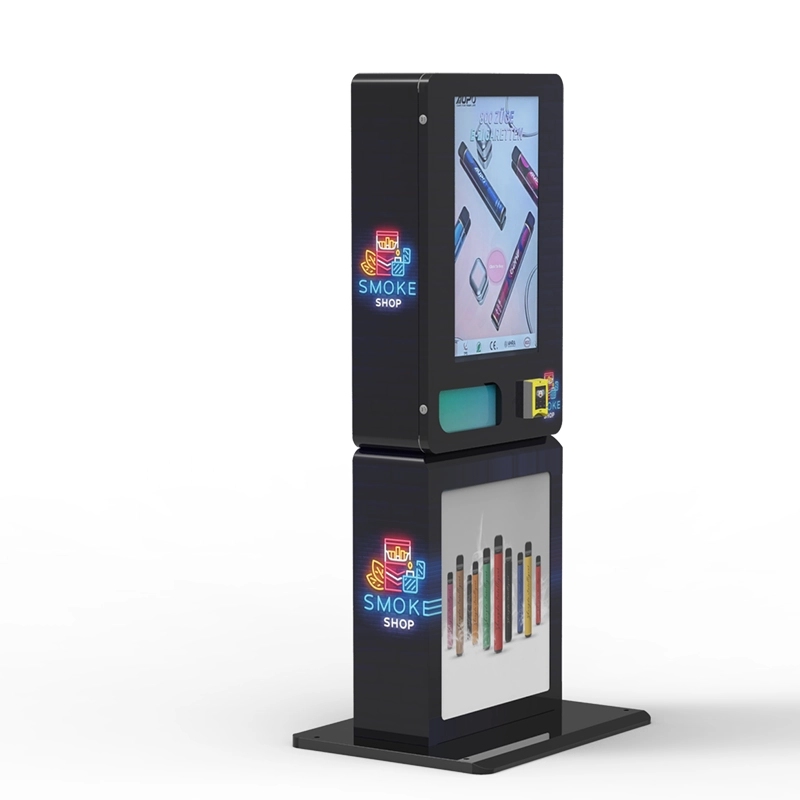
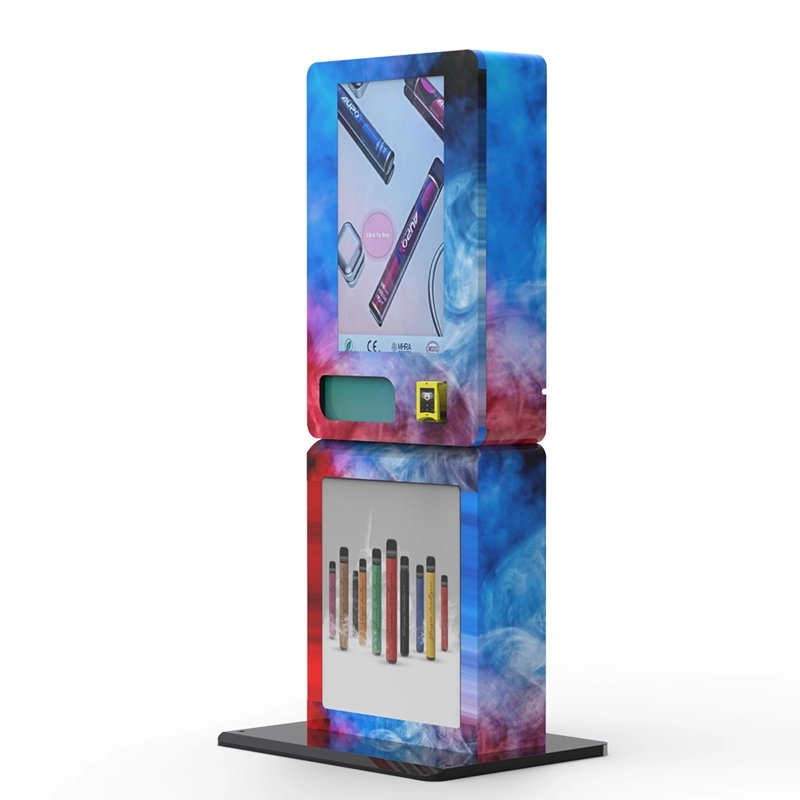
I started with full-size machines that held 300 units. They looked impressive but were hard to place—most locations didn’t have the floor space. Now I mostly use wall-mounted compact units that hold 60 to 80 units. They fit on a countertop or mount to a wall, and they’re easier to move when a location doesn’t work out. The tradeoff is you restock more often. But the flexibility is worth it. I’ve placed compact units in a barber shop, a laundromat, and a small convenience store—all locations that would never have room for a full-size machine. The revenue per square foot is actually higher on the compact units because they’re placed in tighter, higher-traffic spots.
If you’re looking at a compact design, check the wall-mounted compact e-cigarette vending machine from Zhongda. It has the same age verification scanner as their full-size units, so you don’t sacrifice compliance for footprint. I’ve deployed ten of these in the last year and only had one scanner issue, which was a firmware glitch that they patched remotely.
Long-Term Operation Strategy
Running a vape vending route is not passive income. You have to restock, clean, audit logs, and deal with location management. After the first year, most operators either scale up to 20+ machines or sell off their route. The ones who scale succeed because they standardize on one machine model and one verification system. That way, spare parts are interchangeable, and technicians don’t have to learn multiple systems. I keep a spreadsheet of every machine’s serial number, location contact, scanner firmware version, and restock schedule. That sounds basic, but I’ve met operators who lose track of which machine has which firmware and end up with compliance gaps.
One strategy that works: rotate machines between locations every 12 to 18 months. A machine that’s been in a bar for a year starts looking worn, and customers stop noticing it. Move it to a new spot, clean it up, and it feels fresh. I’ve seen a 20% revenue bump just from relocating a machine to a different venue in the same neighborhood.
Handling Compliance Audits
When a compliance officer shows up, they want to see transaction logs that prove every sale was age-verified. I keep a dedicated tablet in each machine that stores the last 12 months of logs. The logs include the scanned ID barcode data (not the full number, just the birth date and expiration), the timestamp, and the product sold. If the officer asks for a specific date, I can pull it up in under a minute. I’ve been audited three times. Twice they just looked at the logs and left. Once they asked to see a live verification test—I ran a test sale with my own ID, it passed, and they moved on. The key is to have a system that logs everything automatically and doesn’t let the operator delete or edit entries. If your machine lets you clear logs manually, you’re inviting trouble.
Risk Factors and Failure Cases
I’ve seen operators lose their entire investment because they ignored one of three things: location contract terms, local zoning laws, or scanner maintenance. A friend of mine placed a machine in a bar that had a “no tobacco sales after 10 PM” rule written into its liquor license. He didn’t read the contract. The bar got fined, and he got kicked out. Another operator bought a machine with a scanner that only read magnetic stripes, but his state started issuing IDs with chip-based data. The scanner couldn’t read them, and he had to replace every unit. That cost him $8,000.
The biggest failure case I’ve seen was an operator who bought 15 machines from a cheap overseas manufacturer. The scanners were generic units that failed compliance checks in three different states. He had to retrofit every machine with a new scanner and control board, which cost more than buying compliant machines upfront. He went out of business within a year. The lesson: don’t buy a machine that doesn’t have a UL or CE certification for the electrical components and a scanner that’s been tested against state-specific ID formats. I only buy from manufacturers that provide a compliance certificate with each unit. Zhongda Smart’s service team provides that documentation with every machine, which saved me during an audit when the officer asked for proof of scanner certification.
Industry Data Points
According to a report from IBISWorld, the vending machine industry in the US generated over $7.5 billion in 2023, with tobacco and nicotine products accounting for roughly 12% of that revenue. The same report notes that automated retail for age-restricted products is growing at about 8% annually, driven by labor shortages and the shift toward self-service. Another data point from Statista shows that 68% of consumers aged 21 to 35 prefer using a self-service kiosk over a staffed counter for purchasing age-restricted items, citing speed and privacy. That aligns with what I’ve seen: customers don’t want to interact with a clerk when buying vapes. They want to scan, pay, and leave. A machine that does that cleanly will outperform a staffed counter in the same location.
Final Thoughts from the Field
I’ve been doing this long enough to know that the technology changes faster than the regulations. The scanner you buy today might not meet next year’s requirements if your state adds a biometric check or a real-time database lookup mandate. That’s why I buy machines with upgradeable control boards. When a new regulation comes out, I can swap the board or update the firmware instead of replacing the whole machine. I’ve done that twice in the last five years—once for a state that added a requirement for a secondary age check via mobile app, and once for a state that changed the acceptable ID formats. The upgrade cost was about $150 per machine. The alternative would have been $4,000 per new machine.
If you’re serious about getting into this business, start with one or two machines in high-traffic locations. Run them for six months. Track every cost and every compliance check. Then scale. Don’t buy 20 machines upfront—you’ll learn things in the first three months that change your equipment choice. I made that mistake early on and ended up selling five machines at a loss because they didn’t fit the locations I secured later.
Frequently Asked Questions
What is the minimum age requirement for using a vape vending machine?
Can I use a smartphone app instead of a physical ID scanner?
How do I handle a customer whose ID scanner fails?
Do I need a special license to operate a vape vending machine?
How long do transaction logs need to be stored?
Can I place a vape vending machine outdoors?
What’s the typical warranty on a compliant vape vending machine?
References and Sources
- IBISWorld – Vending Machine Operations in the US Industry Report (2023). ibisworld.com
- Statista – Consumer preference for self-service kiosks for age-restricted products (2022). statista.com
- FDA – Age Verification Requirements for Tobacco Products. fda.gov
- National Automatic Merchandising Association (NAMA) – State-by-State Vending Compliance Guide. namanow.org








