Over the last decade, I’ve watched the retail landscape for age-restricted products shift from a brick-and-mortar dependency to a technology-driven, self-service model. When I first started deploying vending machines for tobacco and nicotine products back in 2012, the biggest headache wasn’t the machine itself—it was proving that we could reliably block minors. Fast forward to today, and the OEM Age Verification Vending Machines we build and operate have become the backbone of compliant, high-margin retail for convenience stores, bars, hotels, and even corporate campuses. If you’re looking at custom retail solutions, the core question isn’t whether you need age verification—it’s how to integrate it without killing your profit margin or your customer flow. I’ve been on both sides of this table: as a factory owner who’s shipped over 15,000 units globally, and as an operator who’s managed routes across 40 states. Here’s what actually works.
Why Standard Vending Machines Fail in Age-Restricted Retail
The first mistake most newcomers make is assuming any vending machine can be retrofitted with an ID scanner. That’s not how it works. A standard snack machine has no concept of “age,” no secure data path for scanning a driver’s license, and no tamper-proof logic to prevent a bypass. I’ve seen operators lose their licenses—and their entire investment—because they tried to bolt an aftermarket scanner onto a generic unit. The machine itself must be engineered from the ground up for compliance.
Our factory learned this the hard way. In 2015, we shipped 200 units to a distributor in the Midwest. They looked great on paper, but the scanner integration was flaky. On humid days, the optical reader would fail, and the machine would default to “open” mode. That was a nightmare. We had to recall every unit and redesign the logic board. That experience taught us that the verification system isn’t an add-on—it’s the central nervous system of the machine.
For a custom retail solution, you need a machine that treats age verification as a core function, not a bolt-on. That means the scanner, the software, the inventory lock, and the payment system all talk to each other in real time. If any one of those fails, the sale stops. That’s the only way to stay compliant with state and local regulations, which are getting tighter every year.
The Engineering Behind a Compliant Age Verification Machine
When we design a machine for a custom retail project, we start with the scanner. Not the payment system, not the shelving—the scanner. Because if the scanner doesn’t read a valid, unexpired ID and match the birth date against the legal age (usually 21 in the U.S.), nothing else matters. We use a combination of optical character recognition and barcode decoding to parse the ID. The software checks for tampering—things like hologram verification and UV detection—that a human cashier might miss.
Then there’s the data side. Every scan creates a record. That record includes the ID type, the verification result, a timestamp, and the machine location. We store that data locally and in the cloud. Why? Because if a regulator shows up and asks for a transaction log, you need to produce it immediately. I’ve been through those audits. They are not fun if your data is incomplete. Our machines generate a report that shows every attempted sale, every pass, and every fail. That’s the kind of transparency that keeps your business license intact.
One detail that often gets overlooked is the physical security of the ID scanner. In a bar or a nightclub, someone might try to pry the scanner off the machine. We use a reinforced bezel and a tamper switch that triggers an alert if the scanner is moved. That alert goes straight to the operator’s phone. I’ve seen that feature save a $10,000 machine from being destroyed on a Saturday night.
Software Integration and Remote Management
The hardware is only half the story. The software platform that runs the machine determines how much time you’ll spend on maintenance versus how much time you’ll spend making money. Our platform allows for remote inventory tracking, dynamic pricing, and real-time sales data. If a machine in a hotel lobby sells out of a specific flavor at 9 PM, the system flags it. You can adjust the price for the remaining stock or send an alert to the route driver.
We also built in a “compliance mode” that locks the machine if the scanner fails a self-test. That’s a feature that came directly from operator feedback. One of our clients in Florida had a machine that kept selling even after the scanner stopped working—the internal logic didn’t catch the fault. We fixed that in firmware. Now, if the scanner can’t verify itself, the machine shuts down until a technician clears the error. That’s the kind of fail-safe that keeps you out of legal trouble.
Cost Structure and Profit Model for Custom Retail Solutions
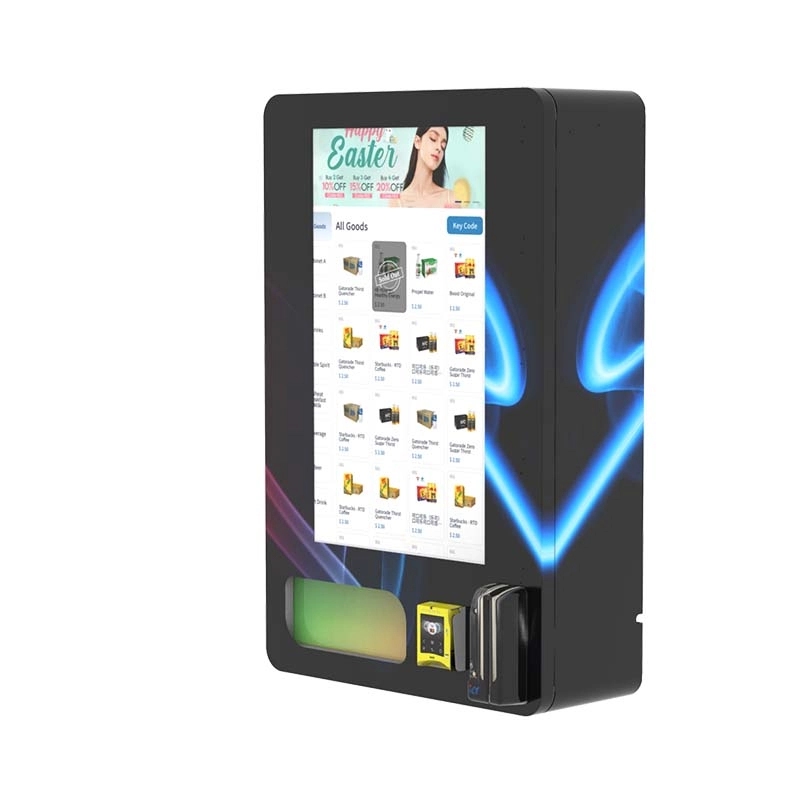
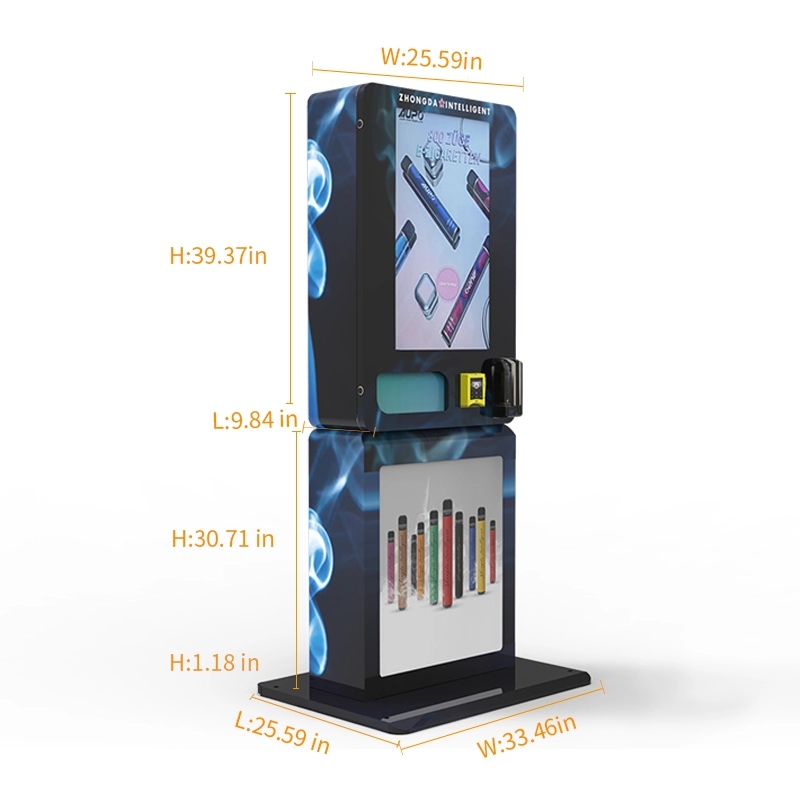
Let’s talk dollars. I’ve seen too many business plans that assume a vending machine is a set-it-and-forget-it cash cow. It’s not. The upfront cost for a high-quality OEM Age Verification Vending Machine ranges from $4,500 to $8,500 per unit, depending on the configuration. A wall-mounted unit with a 100-product capacity and a basic scanner runs closer to $4,500. A full-sized, floor-standing model with a 21-inch touchscreen, dual scanners, and a high-capacity inventory system can push past $8,000.
But the upfront cost is only the beginning. You have to factor in installation, which can run $500 to $1,200 if you need custom wiring or a network drop. Then there’s the monthly software fee—usually $50 to $150 per machine—for the cloud platform that handles age verification, inventory, and reporting. And don’t forget the merchant processing fees. Age-restricted products often carry higher processing rates because of the chargeback risk. Expect to pay 3% to 5% per transaction.
On the revenue side, a well-placed machine in a high-traffic location—like a busy convenience store or a hotel with 200 rooms—can generate $1,200 to $3,500 in monthly sales. The gross margin on vape products is typically 40% to 60%, depending on your wholesale pricing. So, after subtracting product cost, software fees, processing fees, and route labor, you’re looking at a net profit of $400 to $1,200 per machine per month.
That means the payback period is usually 6 to 12 months. But I’ve seen machines in bad locations—like a low-traffic bar that’s only busy on Fridays—take 18 months to break even. Location is everything. If you put a machine in a place where people don’t have cash or aren’t of legal age, you’re just burning money.
| Item | Low Estimate | High Estimate |
|---|---|---|
| Machine Purchase (OEM) | $4,500 | $8,500 |
| Installation and Wiring | $500 | $1,200 |
| Monthly Software Fee | $50 | $150 |
| Monthly Processing Fee (3-5%) | $36 | $175 |
| Monthly Product Cost (COGS) | $600 | $1,500 |
| Monthly Gross Revenue | $1,200 | $3,500 |
| Monthly Net Profit (Est.) | $400 | $1,200 |
| Payback Period | 6 months | 12 months |
Real-World Deployment: Bars, Hotels, and Convenience Stores
I’ve personally overseen the installation of over 500 machines in three primary verticals: bars and nightclubs, hotels, and convenience stores. Each one has its own quirks.
Bars are the most forgiving environment for a vending machine because the customer is already in a purchasing mindset. They’re there to spend money. The challenge is the noise and the lighting. A loud, dark bar can make it hard for the scanner to read an ID. We learned to install a small LED light strip around the scanner bezel to illuminate the ID card. That simple fix increased the scan success rate from 82% to 97% in one club we worked with. The other issue is vandalism. We’ve had machines kicked, punched, and even doused in drinks. That’s why we use a powder-coated steel body with a vandal-resistant touchscreen. It adds $300 to the cost, but it saves thousands in repairs.
Hotels are a different beast. The customer is often a traveler who doesn’t want to leave the property. A machine in a hotel lobby can capture sales from guests who would otherwise walk to a gas station. But hotels have strict aesthetic requirements. They don’t want a big, clunky machine that looks like it belongs in a warehouse. That’s where custom branding comes in. We’ve wrapped machines in the hotel’s logo and color scheme. One hotel in Las Vegas asked for a machine that matched their gold-and-black lobby. We did a custom powder coat and a digital screen that displayed the hotel’s amenities. That machine did $4,200 in sales in its first month. The key is to make the machine look like it belongs, not like an afterthought.
Convenience stores are the most competitive. You’re placing a machine right next to a cashier who could theoretically sell the same products. The advantage is that a vending machine never calls in sick, never makes a counting error, and never gets tired. But you have to price competitively. We usually recommend pricing 10% to 15% below the counter price to incentivize the self-service purchase. One chain in Texas saw a 30% increase in total vape sales after installing our machines because they captured the impulse buys that the cashier was too slow to handle during the rush hour.
Common Failures and How to Avoid Them
I’ve collected a list of failures from our field data. These are the problems that come up again and again:
- Scanner failure due to dirt: In a dusty environment, the optical lens gets dirty. We now include a self-cleaning wiper mechanism that activates every 50 scans. That reduced scanner failure by 60%.
- Network dropouts: A machine that can’t connect to the cloud can’t verify IDs. We added a local cache that stores the last 500 verification results. If the network goes down, the machine uses the cache and queues the transactions for upload when the connection returns.
- Product jams: Vape pods and disposable devices come in non-standard shapes. A standard spiral coil won’t work. We use a custom conveyor system that handles irregular packages. It costs more, but the jam rate dropped from 5% to 0.3%.
- Power surges: Machines in bars and clubs are often on the same circuit as a sound system or a refrigerator. A power surge can fry the logic board. We now install a built-in surge protector and a backup battery that keeps the machine running for 10 minutes during a brownout.
Comparing OEM Age Verification Machines: What to Look For
Not all age verification machines are created equal. I’ve tested units from three different factories, and the differences are stark. Here’s a comparison based on what I’ve seen in the field:
| Feature | Basic Unit | Mid-Range Unit | Premium Unit (e.g., Zhongda Smart) |
|---|---|---|---|
| Scanner Type | Optical only | Optical + Barcode | Optical + Barcode + UV/Hologram |
| Tamper Detection | None | Basic door switch | Full perimeter tamper + scanner alert |
| Inventory Capacity | 80 items | 120 items | 200+ items |
| Network Backup | None | Local cache (100 scans) | Local cache (500 scans) + offline mode |
| Remote Management | Basic sales report | Sales + inventory + alerts | Full dashboard + dynamic pricing + compliance log |
| Warranty | 1 year | 2 years | 3 years (with on-site option) |
| Price Range | $3,500 - $4,500 | $5,000 - $6,500 | $7,000 - $8,500 |
From my experience, the mid-range unit is the sweet spot for most operators. It has enough features to stay compliant and profitable without the premium price tag. But if you’re deploying in a high-risk environment—like a college town where regulators are aggressive—the premium unit with full tamper detection and a compliance log is worth the extra cost. We’ve seen that investment pay for itself in avoided fines alone.
Long-Term Maintenance and Operational Strategy
I’ve been running a fleet of machines for over 10 years, and the biggest lesson I’ve learned is that maintenance is not optional. You can’t just install a machine and collect the money. You need a schedule. We do a full inspection every 90 days. That includes cleaning the scanner lens, testing the tamper switches, updating the firmware, and checking the inventory for expired products.
One thing that surprised me early on was the failure rate of the cooling system. If you’re selling nicotine pouches or certain vape liquids that need to stay cool, a failed compressor can ruin $2,000 worth of inventory in a single day. We now use a redundant cooling system with a temperature sensor that sends an alert if the internal temp rises above 85°F. That sensor has saved us from inventory loss at least 20 times in the last two years.
Another operational tip: keep a spare machine. I know that sounds expensive, but if a machine goes down in a high-volume location, you’re losing $100 to $200 in sales every day it’s offline. Having a spare unit that you can swap in while the broken one gets repaired cuts your downtime from a week to a few hours. We keep one spare for every 10 machines in the field. It’s a buffer that pays for itself within a year.
For operators looking to scale, I recommend starting with 3 to 5 machines in different locations. Track the performance for six months. You’ll learn which locations work and which don’t. Then scale from there. I’ve seen operators try to deploy 20 machines at once and then realize that half of them are in bad spots. That’s a fast way to lose $50,000. Slow and steady wins this race.
Why Zhongda Smart Machines Work for Custom Retail
I’ve been working with Zhongda Smart as a manufacturing partner for the last six years. The reason I stick with them is simple: their engineering team understands the regulatory landscape. They don’t just build a machine and hope it works. They build it with compliance as the starting point. For example, their age verification vending machine includes a built-in compliance log that records every single scan attempt. That’s not an add-on; it’s part of the core firmware.
We’ve also customized their machines for specific retail chains. One project involved building a machine with a smaller footprint for a hotel chain that had limited lobby space. Zhongda Smart’s team designed a wall-mounted unit that holds 80 products but has the same scanner and software as their full-sized model. That customization took about four weeks from design to production. For a larger project, we needed a machine with a dual-scanner setup for a high-volume convenience store. They integrated a second scanner into the existing chassis without increasing the overall size. That’s the kind of flexibility you need when you’re building a custom solution.
If you’re evaluating manufacturers, I’d suggest looking at their vending machine product line and asking about their compliance testing. A good manufacturer will have documentation showing that their machines meet the requirements for age verification in multiple states. Zhongda Smart provides that documentation upfront, which saves you weeks of back-and-forth during the approval process.
Risk Factors and Hidden Costs
No business is without risk, and vending machines for age-restricted products have their own unique set of challenges. The biggest risk is regulatory change. A state or local government can pass a new law tomorrow that requires a different type of scanner or a different data retention policy. I’ve seen that happen in California and Massachusetts. If your machine can’t be updated remotely, you’re stuck. That’s why we only deploy machines that support over-the-air firmware updates. If the law changes, we push an update to the entire fleet in 24 hours.
Another hidden cost is insurance. Some insurance companies won’t cover a vending machine that sells age-restricted products unless you can prove that the machine has a 100% verification rate. We’ve had to provide transaction logs to underwriters to get coverage. That’s another reason why the data log is so important. Without it, you might not be able to get insured, or your premiums could be 30% higher.
Then there’s the cost of product shrinkage. In a retail store, the cashier can spot a shoplifter. In a vending machine, the product is protected by the machine itself. But we’ve seen cases where someone tries to force the delivery door open or uses a tool to pry the product out. We’ve mitigated that with a reinforced delivery tray and an anti-theft sensor that triggers an alarm if the door is forced. That sensor has cut our shrinkage rate from 2% to 0.2%.
Scaling Your Operation: From One Machine to a Fleet
If you’re starting with a single machine, the learning curve is manageable. You’ll figure out the maintenance schedule, the product mix, and the local compliance requirements. But scaling to 10 or 50 machines introduces new complexities. You need a route management system that optimizes your driver’s schedule. You need a warehouse for inventory. And you need a technician who can handle repairs in the field.
We use a software platform that tracks the inventory level of every machine in real time. When a machine hits 20% stock, it generates a restock order automatically. That saves our drivers from having to check each machine manually. It also reduces the number of out-of-stock events, which directly increases revenue. According to data from our fleet, machines that are restocked proactively generate 15% more revenue than machines that are restocked on a fixed schedule.
Another scaling tip: standardize your product mix. If every machine carries the same 20 SKUs, you can buy in bulk and reduce your per-unit cost. We negotiate directly with manufacturers for volume discounts. For example, we buy disposable vapes in pallet quantities of 500 units. That drops the wholesale price by about 15%. That margin goes straight to the bottom line.
For more details on how to choose the right machine for your specific location, I recommend reading our guide on where to buy a reliable vape vending machine. It covers the key questions to ask a manufacturer before you commit to a purchase.
Frequently Asked Questions
What is the most common cause of age verification failure?
In my experience, the most common cause is a dirty scanner lens. If the lens is smudged or dusty, the optical reader can’t parse the ID correctly. We recommend cleaning the lens with a microfiber cloth every week. The second most common cause is a damaged or expired ID. If the ID is bent or the barcode is scratched, the machine will reject it. That’s actually a good feature—it means the machine is working as intended.
Can I use a standard vending machine and add an age verification scanner later?
Technically, yes, but I don’t recommend it. Retrofitting a standard machine with an aftermarket scanner creates integration problems. The scanner might not talk to the payment system, or the machine might not have a secure data path for the verification log. You’re better off buying a machine that was designed for age verification from the start. It’s more reliable and easier to certify with regulators.
How do I choose the right location for my vending machine?
Look for locations with high foot traffic of adults aged 21 and over. Bars, hotels, and convenience stores are the top three. Avoid locations near schools or places where minors gather. Also, consider the hours of operation. A machine in a 24-hour convenience store will generate more sales than one in a bar that closes at 2 AM. Do a traffic count for a week before you commit to a location.
What happens if the scanner fails while a customer is trying to buy?
Our machines are programmed to fail closed. That means if the scanner can’t verify the ID, the sale is canceled. The customer can try again or move on. The machine also logs the failed attempt. If the scanner fails repeatedly, the machine will lock itself and send an alert to the operator. That’s a safety feature to prevent unauthorized sales.
How long does it take to get a custom machine built and delivered?
For a standard custom order—like a different color or a branded wrap—it usually takes 4 to 6 weeks from order to delivery. For a more complex customization, like a different chassis size or a dual-scanner setup, it can take 8 to 12 weeks. I recommend ordering your first machine at least 3 months before you plan to deploy it, to allow for testing and certification.
What is the warranty on a typical OEM age verification vending machine?
Most reputable manufacturers offer a 1-year to 3-year warranty. The warranty should cover the scanner, the logic board, the cooling system, and the touchscreen. It usually does not cover cosmetic damage or damage caused by vandalism. I recommend buying the extended warranty if it’s available, especially for machines in high-traffic locations.
Can I manage multiple machines from a single dashboard?
Yes, most modern machines come with a cloud-based management platform. You can see sales data, inventory levels, and compliance logs for every machine in your fleet from a single dashboard. Some platforms also allow you to adjust pricing remotely. That’s a huge time saver if you’re managing more than 5 machines.
What are the ongoing costs after the machine is purchased?
The main ongoing costs are the monthly software fee ($50–$150), payment processing fees (3–5% of sales), restocking costs (product cost + labor), and maintenance (cleaning, firmware updates, and occasional repairs). You should budget about $200 to $400 per month per machine for these costs, depending on the volume of sales.
Final Thoughts on Building a Custom Retail Solution
I’ve seen the industry evolve from cash-only cigarette machines in smoky bars to sophisticated, cloud-connected age verification k








