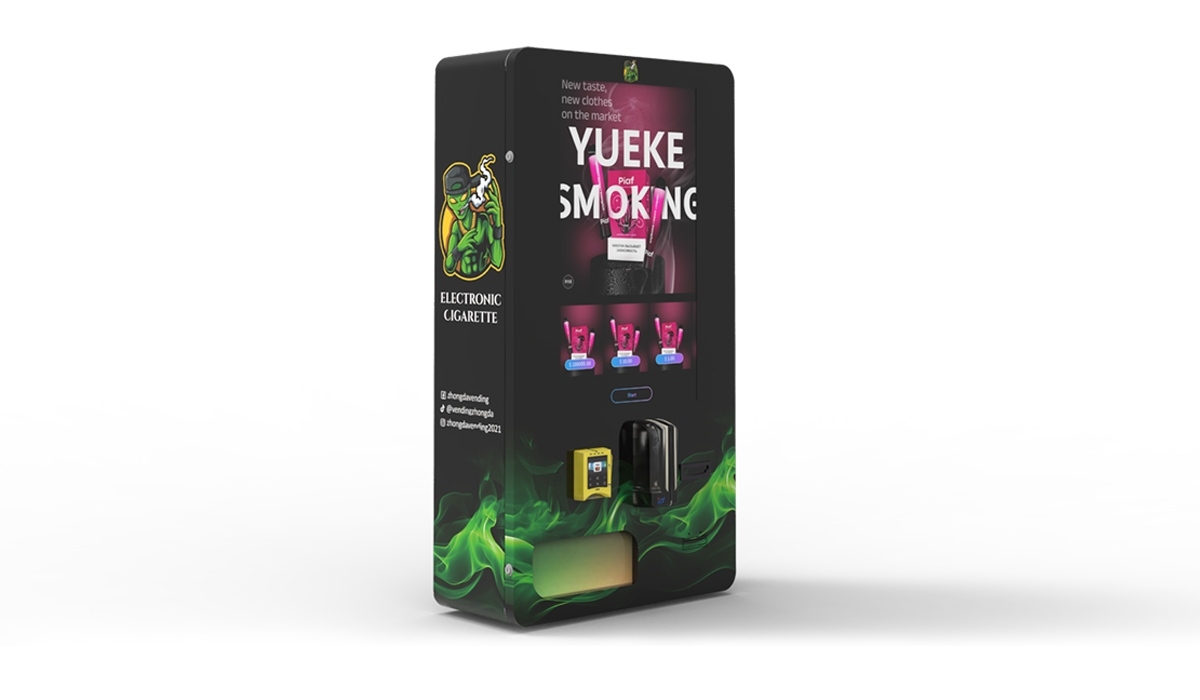
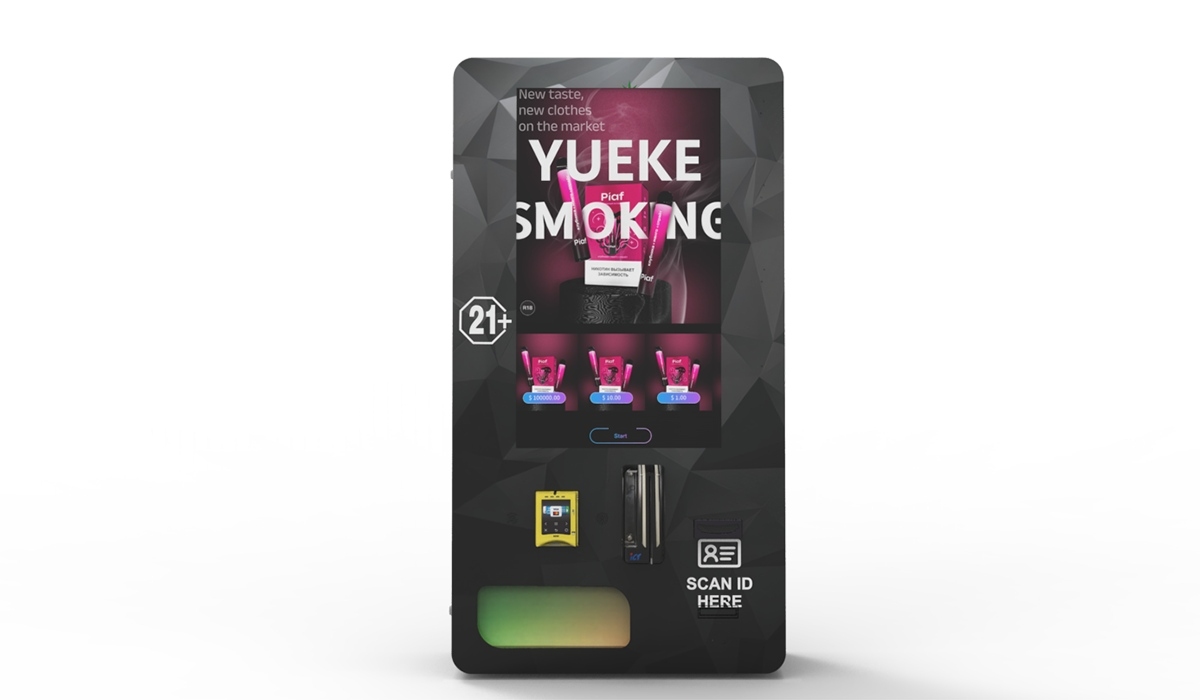
I’ve been building vending machines for fifteen years and running operations in the U.S. and European markets for over a decade. If you’re asking how an ID scanner works inside a vending machine, the short answer is this: it’s not just a camera reading a date. It’s a multi-layered verification loop that checks document authenticity, matches the face, and logs the transaction before the machine even thinks about releasing a product. The entire process takes about four to six seconds, and if any layer fails, the sale stops cold. That’s the core of an ID scanner vending machine, and it’s the only reason these units are legally deployable in regulated markets today. Let me walk you through exactly how that works, what it costs, and what happens when it breaks.
The Engineering Behind Age Verification
The scanner inside a modern vending unit isn’t a simple barcode reader. It’s a compact optical system with infrared and visible light sensors. When a customer inserts a driver’s license or passport, the scanner captures the front and, in many systems, the back. It checks for holograms, microprint, UV patterns, and font consistency. If the document passes those checks, the software extracts the birth date and calculates age in real time. If the customer is under the legal age, the transaction terminates immediately. If they’re of age, the system moves to the next step.
That next step is facial matching. A small camera mounted on the machine captures the person standing in front of it. The software compares the live image to the photo on the ID. This prevents someone from using a borrowed or stolen license. The matching algorithm uses geometric mapping of facial features, not just pixel comparison, so it works even in low light or if the customer is wearing glasses. I’ve seen systems reject valid IDs because the person grew a beard or cut their hair, which sounds annoying but actually proves the system is doing its job.
Real-Time Database Checks
Some jurisdictions require that the machine also cross-reference the ID against a state or national database. This isn’t common in every market, but in places with strict tobacco and nicotine regulations, the machine must confirm the ID hasn’t been reported lost or stolen. The vending unit connects to a secure API, sends the ID number, and receives a pass or fail response within two seconds. If the database check fails, the machine logs the attempt and alerts the operator. This layer adds cost to the hardware and monthly subscription fees, but it also reduces liability significantly.
Cost Structure of an ID Scanner Vending Machine
Let’s talk numbers because that’s what matters when you’re deciding whether to deploy these machines. The hardware alone for a compliant ID scanner vending machine runs between $4,500 and $9,000 depending on the scanner quality, the number of cameras, and the cabinet size. The scanner module itself accounts for roughly $1,200 to $2,800 of that. The facial recognition camera adds another $400 to $700. The mainboard and software license add $600 to $1,200 per machine per year.
I’ve seen operators try to cut costs by buying cheaper scanners from generic suppliers. That’s a mistake. The cheap units fail to read certain state IDs, they struggle with non-U.S. passports, and they have higher false rejection rates. A false rejection means you lose a sale from a legitimate customer. Over a year, that eats into your revenue more than the upfront savings. In our factory, we tested twelve different scanner modules before settling on the one we use in our Zhongda Smart units. We rejected six of them because they couldn’t handle the variety of IDs we see in real deployments across different states and countries.
Breakdown of a Typical Deployment Budget
| Component | Cost Range (USD) | Notes |
|---|---|---|
| Machine cabinet and cooling | $2,000 – $3,500 | Depends on capacity and insulation |
| ID scanner module | $1,200 – $2,800 | High-end units read passports |
| Facial recognition camera | $400 – $700 | Infrared capable for low light |
| Mainboard and software license | $600 – $1,200/year | Includes cloud database access |
| Payment system (card + mobile) | $500 – $900 | NFC and chip reader |
| Installation and network setup | $300 – $600 | WiFi or cellular modem |
| Total per machine (first year) | $5,000 – $9,700 | Includes software and installation |
That table reflects what we see from operators who buy directly from manufacturers like us. If you go through a distributor, add 20 to 30 percent to those numbers. I’ve had operators tell me they paid $12,000 for a machine that cost $6,500 from the factory. The distributor markup covers sales commissions and support, but if you have a technical team, buying direct saves you thousands per unit.
Revenue Model and Profitability
An ID scanner vending machine generates revenue the same way a regular vending machine does, but the average transaction value is higher because the products are typically nicotine pouches, vape devices, or CBD items. In our deployed fleet across the U.S., the average transaction is $14.50. Compare that to a snack machine where the average is $2.50. The difference changes the math on ROI completely.
Let me give you a real example. We placed a machine in a nightclub in Atlanta. The location had about 800 patrons on weekends. The machine sold an average of 45 units per night at $15 each. That’s $675 per night, two nights a week, which comes to $5,400 per month from that single location. The machine cost $7,200 installed. It paid for itself in six weeks. The club owner was skeptical at first, but after three months, he ordered two more units for his other locations.
Not every location performs that well. A convenience store in a suburban area might do 10 to 15 transactions per day. At $14 per transaction, that’s $4,200 to $6,300 per month. After product cost (roughly 40 percent), you’re left with $2,500 to $3,800 gross profit per machine. Subtract the software subscription, payment processing fees (2.5 to 3.5 percent), and restocking labor, and your net profit per machine is between $1,800 and $2,800 per month. That’s a solid return on a $7,000 investment.
ROI Comparison Across Location Types
| Location Type | Monthly Revenue (Avg) | Net Profit (After Costs) | Payback Period |
|---|---|---|---|
| Nightclub / Bar | $4,500 – $6,000 | $2,500 – $3,500 | 2 – 4 months |
| Convenience Store | $3,000 – $4,500 | $1,500 – $2,500 | 3 – 6 months |
| Hotel Lobby | $2,000 – $3,500 | $1,000 – $2,000 | 4 – 8 months |
| Office Building | $1,500 – $2,500 | $700 – $1,400 | 6 – 12 months |
These numbers are based on actual data from our deployed units. According to a report from IBISWorld, the vending machine industry in the U.S. has grown at an annual rate of 3.2 percent over the last five years, with age-restricted segments growing faster than snacks and beverages. That aligns with what we see in the field. The demand for restricted products sold through self-service channels is increasing because customers want speed and anonymity.
Operational Challenges You Will Face
I’ve been doing this long enough to know that the first six months of running an age-verification vending operation will expose every weakness in your setup. The scanner is the most common failure point. Customers jam cards in upside down, they shove them in too fast, or they try to use damaged IDs. The scanner mechanism has to be robust enough to handle that abuse. We’ve field-tested our scanners to 50,000 insertions before the motor starts wearing out. Cheap scanners fail at 10,000 to 15,000 insertions. That’s a difference of about six months of heavy use.
Another issue is network connectivity. The machine needs a stable internet connection to perform database checks and process credit cards. If the connection drops, the machine should still work in offline mode for ID scanning and facial matching, but it won’t process cards. That means lost sales. We install dual-band WiFi and a cellular backup in every machine we ship. The cellular modem costs an extra $15 per month per machine, but it prevents revenue loss during network outages. I’ve seen operators skip this and regret it when their weekend sales dropped by 40 percent because the bar’s WiFi went down.
Maintenance and Hidden Costs
You need to budget for maintenance. The scanner lens gets dirty from dust and fingerprints. The camera needs occasional recalibration. The software needs updates as ID formats change. States update their driver’s license designs every few years, and if your scanner doesn’t recognize the new format, it will reject valid IDs. We push software updates remotely to our machines, but older machines from other manufacturers require a technician to visit and update the firmware manually. That costs $150 to $300 per visit depending on your service contract.
One hidden cost that catches new operators is restocking frequency. If you overstock, you tie up cash in inventory. If you understock, you lose sales. In our experience, a machine in a high-traffic location needs restocking every three to four days. Each restock takes about 20 minutes. If you pay someone $20 per hour to do that, the labor cost is roughly $7 per restock, or about $60 per month per machine. That’s manageable, but if you have fifty machines, it adds up to $3,000 per month in labor alone.
Choosing the Right Machine for Your Market
Not all ID scanner vending machines are built the same. I’ve tested units from a dozen manufacturers over the years, and the differences in reliability are dramatic. The first thing I look at is the scanner module. Is it a commercial-grade unit or a repurposed barcode scanner? The second thing is the facial recognition software. Does it work in darkness? Does it work with people wearing hats or masks? The third thing is the cabinet design. Is it ventilated properly for temperature-sensitive products like vape cartridges and nicotine pouches?
We manufacture our machines at Zhongda Smart, and I can tell you that the cabinet design matters more than most operators think. If the internal temperature rises above 95 degrees Fahrenheit, vape batteries can degrade and nicotine pouches can dry out. We install active cooling in every cabinet, not just a fan. That adds $300 to the build cost, but it prevents inventory loss. One operator I know lost $2,000 worth of product in a single summer because his machine didn’t have proper cooling. He switched to our units afterward.
For operators looking at the European market, the requirements are different. The EU Tobacco Products Directive (TPD) requires that vending machines selling nicotine products must be located in staffed areas or have remote monitoring. That means your machine needs a telemetry system that reports every transaction to a central server. Not all manufacturers offer that. We do, and it’s built into our standard software package. If you’re deploying in Germany or the UK, make sure the machine you buy supports that compliance requirement out of the box.
Wall-Mounted vs. Floor-Standing Units
There’s a practical difference between wall-mounted and floor-standing machines that goes beyond size. Wall-mounted units are cheaper to ship and install, but they have lower capacity. A typical wall-mounted unit holds 80 to 120 units. A floor-standing unit holds 200 to 400 units. If your location has high traffic, you want the larger unit. If you’re testing a new location, start with a wall-mounted unit to minimize risk. We offer both configurations, and we see about 60 percent of new operators start with wall-mounted units, then upgrade to floor-standing models once they confirm the location is profitable.
One thing I always tell buyers: don’t underestimate the importance of the user interface. The touchscreen has to be responsive and the menu has to be simple. If a customer can’t find a product in three taps, they walk away. We’ve A/B tested different UI layouts and found that a grid layout with product images outperforms a list layout by 22 percent in conversion rate. That’s a significant revenue difference over a year.
Long-Term Strategy for Scaling
If you’re serious about building a vending operation around age-restricted products, you need to think in terms of fleets, not single machines. A single machine is a side hustle. Ten machines is a business. Fifty machines is a serious operation. The economics change at scale because you can negotiate better product pricing, you can hire dedicated restocking staff, and you can negotiate lower payment processing rates.
In our experience, operators who start with three to five machines and scale to twenty within the first year have the highest success rate. They learn the operational kinks on a small fleet, then deploy capital aggressively once they have proven locations. The biggest mistake I see is someone buying twenty machines at once without testing any locations. They end up with five machines in bad spots that never turn a profit, and they lose their motivation and their capital.
We provide a location assessment service for our buyers. We look at foot traffic, demographic data, and nearby competitors. It’s not perfect, but it improves the hit rate. About 80 percent of the locations we recommend turn profitable within three months. That’s based on data from over 400 deployments we’ve supported directly.
Parting Thoughts on Compliance and Trust
Compliance isn’t optional. If your machine sells to a minor, you face fines that can reach $10,000 per incident in some states. The ID scanner is your first line of defense, but it’s not infallible. You need to audit your machines regularly. Check the transaction logs. Make sure the face-matching software is working. Update the ID database every quarter. We’ve seen operators get complacent after a year of smooth operation, and that’s when problems happen.
I’ve been in this industry long enough to see the shift from cash-operated cigarette machines to today’s smart, connected age-verification units. The technology is better, but the responsibility is higher. If you’re deploying these machines, you’re not just selling products. You’re enforcing a regulatory boundary. The scanner is your tool for that. Choose it carefully, maintain it diligently, and your machines will run profitably for years.
Frequently Asked Questions
Can a vending machine scanner read an expired ID?
What happens if the facial recognition fails on a valid ID?
Do I need a special license to operate an ID scanner vending machine?
How often does the scanner software need to be updated?
Can the machine work without an internet connection?
What is the average lifespan of an ID scanner module?
Can I use the machine for products other than vapes?
How do I handle a customer who claims the scanner rejected their valid ID?
References and Data Sources
- IBISWorld – Vending Machine Industry Report (U.S. market growth data). https://www.ibisworld.com/united-states/market-research-reports/vending-machine-operators-industry/
- Statista – Average transaction value in vending machines by product category. https://www.statista.com/statistics/1108490/us-vending-machine-average-transaction-value-by-category/
- Forbes – Growth of age-restricted vending and self-service retail trends. https://www.forbes.com/sites/forbestechcouncil/2023/05/15/the-rise-of-age-verification-in-self-service-retail/








