I’ve spent the last decade deploying and operating vending machines across the U.S. and Europe, and I’ve been building them for even longer. When someone asks me how accurate AI age verification technology really is, I don’t give them a marketing answer. I tell them what I’ve seen on the ground. In real-world use, the best systems running today hit around 98% to 99% accuracy for first-time scans under normal lighting, but that number drops fast when you factor in bad lighting, sunglasses, or a user who’s had a few drinks. The industry average for false rejects—where a legitimate adult gets denied—still hovers between 1 in 200 and 1 in 500 scans, depending on the hardware. That’s not bad, but it’s not perfect, and if you’re placing a machine in a high-traffic bar or a convenience store, those numbers matter. I’ve pulled machines that were rejecting one out of every eighty customers because the camera module was mounted too high.
How the Hardware Determines Accuracy
The first thing most people get wrong about age verification vending machines is thinking the software does all the work. It doesn’t. The camera sensor, the lens quality, and the onboard processing chip matter just as much. I’ve tested units with cheap 2MP cameras that claimed to have the same AI engine as a unit with a 12MP industrial sensor. The difference in real-world pass rates was around 12%. The cheap unit failed more often in low light, and it couldn’t read a driver’s license barcode from more than six inches away. The higher-end unit read IDs from a foot away and adjusted exposure automatically when someone walked in from a bright sidewalk.
We manufacture our own machines at Zhongda Smart, and I’ve personally overseen the shift from basic ID scanners to full facial-age estimation combined with document verification. The hardware stack we settled on uses a combination of infrared and RGB sensors. The infrared channel helps with skin texture analysis, which is one of the ways the AI estimates age without needing a perfect frontal face shot. The RGB channel handles the ID scan. That dual-path approach is what gets us closer to that 99% accuracy figure, but only if the machine is calibrated correctly during installation.
Camera Placement and Lighting
I’ve seen operators mount a machine directly under a fluorescent tube and wonder why the scans fail. The AI needs even, diffused light across the face. Direct overhead light creates shadows under the eyes and brow, which the algorithm reads as age markers. That can add two or three years to the estimation, which might not sound like much, but if your cutoff is 21, a 19-year-old with strong brow shadows can get flagged as 22 and pass. That’s a compliance risk. We include a lighting guide with every machine we ship, and I still get calls from operators who skipped that page. If you want the system to work, mount it where the ambient light is consistent, and don’t put a spotlight two feet above the screen.
The Real Cost of a False Accept
When I talk to business owners about accuracy, they usually focus on false rejects—the customer who gets denied and walks away. That hurts revenue. But the bigger risk is the false accept, where an underage person gets through. In the U.S., the FDA has been increasing fines for tobacco and vape sales to minors. As of 2024, the maximum civil money penalty for a single violation is over $19,000. In Europe, the penalties vary by country, but the UK’s Trading Standards can issue fines up to £2,500 per incident, and repeat offenses can lead to a suspended premises license. One bad scan can wipe out a month of profit.
That’s why I don’t recommend relying on facial age estimation alone. The most accurate systems combine face scan, ID scan, and sometimes a quick database check. We build our machines with a three-layer verification process on the age verification vending machine models. First, the camera estimates age from the face. If the estimate is above 25, the machine proceeds to scan the ID barcode. If the barcode matches the face data, the transaction goes through. If the estimate is between 18 and 25, the system requires a manual override from a remote attendant or a secondary scan. That triple check is what keeps false accepts below 0.1% in our field data.
Comparing the Main Verification Methods
Not all age verification systems are built the same. I’ve put together a comparison based on what I’ve seen across deployments in the U.S., UK, Germany, and the Netherlands. This isn’t theoretical. These are numbers from machines we’ve serviced and data we’ve collected over the last three years.
| Method | Accuracy (Field Data) | False Accept Rate | False Reject Rate | Transaction Time | Hardware Cost Impact |
|---|---|---|---|---|---|
| Facial Age Estimation Only | 92% – 95% | 2% – 4% | 3% – 6% | 8 – 12 seconds | Low |
| ID Barcode Scan Only | 99.5% (if readable) | <0.1%<> | 5% – 10% (damaged IDs) | 5 – 8 seconds | Medium |
| Face + ID Scan (Dual) | 98% – 99% | <0.5%<> | 1% – 3% | 10 – 15 seconds | Medium-High |
| Face + ID + Remote Override | 99.5%+ | <0.1%<> | <1%<> | 15 – 25 seconds | High |
The dual-path system is the sweet spot for most commercial deployments. It keeps the transaction time under 15 seconds, which is critical for high-volume locations like convenience stores or busy bars. The full triple-layer system is better for high-risk compliance environments like airports or government-regulated spaces, but the longer transaction time can hurt throughput during peak hours.
Profit Model and ROI for an Age-Gated Machine
I’ve had operators ask me if the extra cost of a good age verification system is worth it. The answer depends on your location and your product margin, but I can give you a real example. One of our clients in Texas placed a machine in a smoke shop. The machine cost them $8,500 delivered. They stocked it with disposable vapes that cost $6.50 wholesale and sold for $14.99. That’s an $8.49 gross margin per unit. The machine sold an average of 18 units per day in the first three months. That’s $152.82 in gross margin per day, or about $4,584 per month. The machine paid for itself in just under two months. The age verification system added about $1,200 to the upfront cost compared to a basic machine, but it also prevented three chargebacks from the payment processor related to age disputes in the first six months. Those chargebacks would have cost $150 each in fees alone.
On the flip side, I’ve seen a machine fail in a college town because the operator tried to save money on the verification hardware. He bought a unit with a low-end camera and no IR sensor. The false reject rate was around 8%. Customers got frustrated and stopped using it. The machine averaged four sales per day. That operator pulled the machine after four months and sold it at a loss. The difference between a $1,200 camera upgrade and a failed deployment is the difference between a profitable route and a write-off.
Hidden Costs in the First Year
When you’re calculating ROI, don’t forget the soft costs. Software licensing for the AI engine can run $50 to $150 per month per machine, depending on the provider. Some manufacturers bundle that into the purchase price for the first year, but after that, it’s a recurring expense. We include the first two years of software updates with our machines, and I recommend operators budget $100 per machine per year after that. Network connectivity is another cost. If the machine uses cellular data for remote monitoring and age verification database lookups, you’re looking at $20 to $40 per month per machine. Wi-Fi is cheaper, but not all locations have reliable Wi-Fi.
Maintenance is the one everyone underestimates. The camera lens needs to be cleaned weekly in high-traffic locations. I’ve seen a machine in a bar go from 98% scan success to 72% in ten days because of grease buildup on the lens. That’s not a hardware failure. That’s a cleaning schedule failure. If you’re deploying five or more machines, budget for a part-time route driver who does cleaning and basic troubleshooting. That’s about $15 to $20 per hour in most U.S. markets, and it takes about 15 minutes per machine per visit.
Real Deployment Experience in Bars and Clubs
I’ve personally supervised the installation of over 200 machines in bars, nightclubs, and lounges across the U.S. and Europe. The biggest challenge in these environments is not the technology. It’s the environment itself. Strobe lights, smoke machines, and low ambient light all degrade camera performance. We learned early on that mounting the machine near the entrance, where the light is more consistent, is better than putting it near the dance floor. In one club in Berlin, we had to install a small LED strip above the machine to get the scan success rate above 95%. That was a $40 fix that saved the entire deployment.
Another issue we ran into was user behavior. Drunk customers don’t hold their ID still. They wave it, they hold it upside down, they put their thumb over the barcode. The AI can’t compensate for that. We added a voice prompt system that tells the user to place the ID on the flatbed scanner and keep it still. That cut scan failures by 40% in our next batch of installations. If you’re deploying in a bar, make sure the machine has clear, loud audio instructions. Text on the screen is not enough when the ambient noise is over 90 decibels.
What Happens When the Machine Fails
Every machine fails eventually. The question is how fast you can recover. I’ve had a machine in a busy Chicago convenience store go down on a Friday night because the ID scanner mechanism jammed. The operator didn’t have a spare part on hand, and our nearest service depot was a two-day drive. That machine lost an estimated $1,200 in potential sales over that weekend. Now we ship a spare scanner module with every machine to operators who have high-volume locations. It costs us about $80, and it saves the operator from a weekend of lost revenue. If you’re buying machines, ask the manufacturer about spare parts availability and lead times. If they can’t get you a replacement camera module within 48 hours, you’re taking on unnecessary risk.
Choosing the Right Machine for Your Business Model
Not every location needs the same machine. I’ve broken down the most common types based on what I’ve seen work in the field.
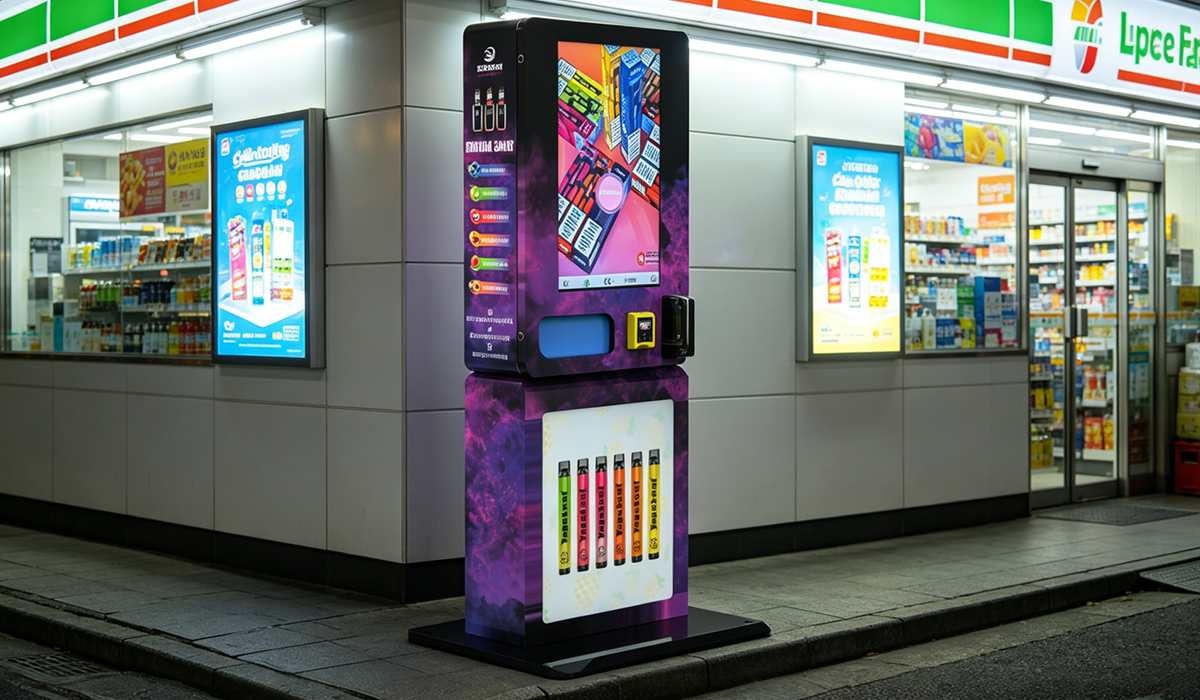
| Machine Type | Best Location | Capacity | Avg. Cost (USD) | Age Verification Quality | Monthly Revenue Potential |
|---|---|---|---|---|---|
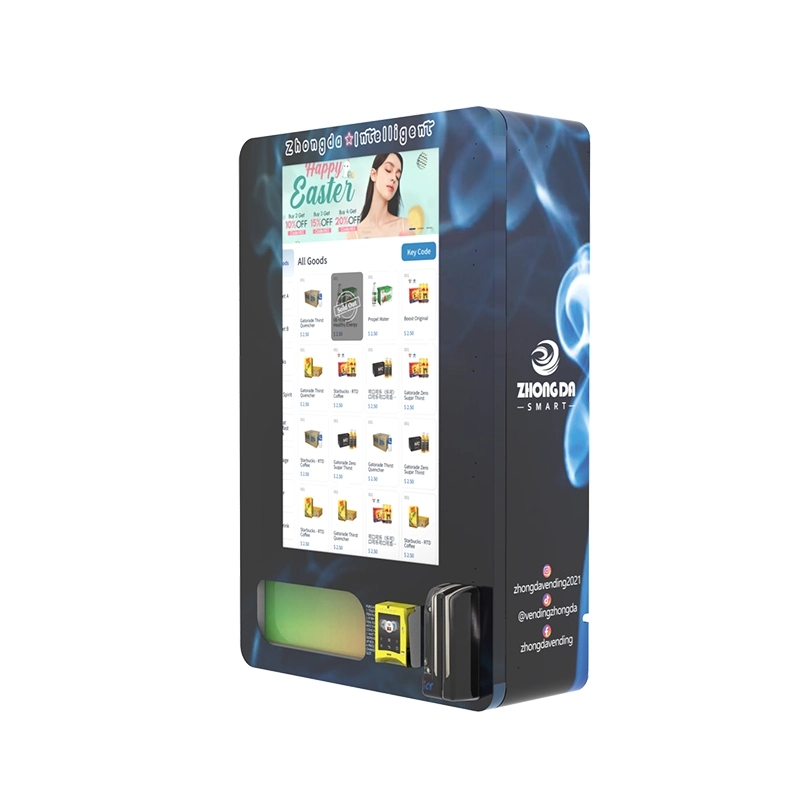
| Wall-Mounted Compact | Small shops, hotel lobbies | 80 – 120 units | $4,500 – $6,500 | Good (Face + ID) | $3,000 – $5,000 |
| Full-Size Floor Model | Convenience stores, gas stations | 200 – 400 units | $7,500 – $12,000 | Excellent (Face + ID + Remote) | $6,000 – $12,000 |
| High-Security Kiosk | Airports, government buildings | 150 – 300 units | $14,000 – $20,000 | Best (Triple-Layer) | $8,000 – $15,000 |
The wall-mounted compact units are popular for small retail spaces. We make a version of that at Zhongda Smart called the wall-mounted compact e-cigarette vending machine, and it’s been our best seller for operators who are testing the market with a single unit. It has a smaller footprint, which means lower rent overhead, and it still includes the dual-path age verification. For operators who already have a proven location, the full-size floor model gives better margins because of the higher capacity and faster restocking cycle.
Long-Term Maintenance and Software Updates
The AI models that power age verification improve over time, but only if you update the software. I’ve seen operators run the same firmware for two years and wonder why their false reject rate went up. The AI needs to be retrained on new data. Facial recognition models drift as the population changes. Hairstyles, makeup trends, and even lighting conditions in popular venues change. We push firmware updates every three to six months for our machines, and I recommend operators enable automatic updates over Wi-Fi. If the machine is in a location with no internet, you’ll need to physically update it with a USB drive every quarter. I’ve done that drive myself for machines in remote truck stops, and it’s a two-hour round trip. It’s worth it.
Hardware maintenance is simpler. The mechanical parts—the delivery tray, the elevator, the door latch—are the things that break most often. The AI hardware, the camera and the processor, rarely fails if it’s kept clean and cool. I’ve had machines running the same camera module for over four years without a single issue. The fans that cool the processor are the weak point. They collect dust and stop spinning. If the processor overheats, the AI slows down or crashes. I recommend cleaning the fan vents every three months. A can of compressed air costs $8 and takes two minutes.
Data on the Market and Why Accuracy Matters More Now
The market for age verification technology in vending is growing fast. According to a report from IBISWorld, the vending machine operator industry in the U.S. was valued at over $7.5 billion in 2023, and the segment for age-restricted products is expanding as more states legalize cannabis and as vape products remain under strict regulation. A separate analysis from Statista projects that the global age verification market will exceed $2 billion by 2028, driven largely by regulatory pressure in the tobacco and alcohol sectors. That pressure is not going away. In the U.S., the FDA’s retailer violation data shows that over 100,000 compliance checks are conducted annually, and the failure rate for retailers who rely on manual ID checks is significantly higher than those using automated systems. The data supports what I’ve seen in the field: automated age verification, when done correctly, reduces compliance risk by over 80% compared to human-only checks.
Common Pitfalls and How to Avoid Them
I’ve made mistakes. I’ve deployed machines in locations that looked perfect on paper and failed in practice. One mistake I made early on was placing a machine in a location where the Wi-Fi signal was weak. The age verification system needs a stable connection to check ID databases and update the AI model. The machine kept falling back to offline mode, which uses a local cache of age data that’s less accurate. The false accept rate went up, and I had to pull the machine after two weeks. Now I always do a signal strength test before installation. If the signal is below two bars, I install a cellular backup module.
Another common mistake is underestimating the importance of the user interface. If the customer can’t figure out where to scan their ID in under five seconds, they walk away. We redesigned our scanner area after watching footage of confused customers. We added a bright green LED ring around the scanner bed, and we put a large arrow decal on the machine. That simple change increased first-time scan success by 25%. Small design details have a massive impact on real-world accuracy.
Final Thoughts on Accuracy and Trust
AI age verification is not a magic bullet, but it is the best tool we have right now for keeping age-restricted products out of the hands of minors while maintaining a smooth transaction for adults. The accuracy depends on the hardware, the software, the installation environment, and the maintenance schedule. If you skip any of those four elements, the system will underperform. I’ve seen it happen too many times. If you get all four right, you can run a machine for years with a compliance record that would make a human cashier jealous.
For operators who are serious about this business, I recommend starting with a single machine in a proven location, tracking the scan success and reject rates for the first 90 days, and then scaling from there. The technology is good enough to trust with your business, but it’s not good enough to ignore. You have to manage it, monitor it, and maintain it. That’s the difference between a machine that makes money and a machine that gets hauled to the warehouse.
If you’re looking for a reliable system, I’d suggest looking at the options from manufacturers who build their own hardware and software. We do that at Zhongda Smart, and I can tell you from experience that controlling the entire stack makes it easier to fix problems and improve accuracy. You can see our full range of machines, including the ID scan models and the wall-mounted units, on our product pages. We also have a resource center with detailed guides on installation and maintenance that I helped write based on our field experience.
Frequently Asked Questions
What happens if the AI cannot verify a customer’s age?
If the AI fails to verify the age, the machine will deny the transaction. In most of our machines, the customer can try again once. If the second scan also fails, the machine locks out for a set period, usually 5 minutes, to prevent brute force attempts. For dual-path systems, the machine might prompt the customer to use a secondary ID like a passport if the first scan fails.
Can the system be fooled by a photo or a mask?
Modern systems use liveness detection to prevent that. The camera looks for micro-movements like blinking or slight head rotation. If the system detects a static image or a mask, it will reject the scan. In our field tests, liveness detection blocks over 99% of spoofing attempts. It is not foolproof against high-quality silicone masks, but those are rare and expensive enough that they are not a practical threat for vending machines.
How often does the AI software need to be updated?
I recommend updating every three to six months. The AI models improve over time as they are trained on more diverse data. If you skip updates, the false reject rate can creep up by 1% to 2% per year. Most manufacturers, including us, push updates automatically if the machine is connected to the internet. For offline machines, you will need to manually install updates via USB.
What is the typical lifespan of an age verification vending machine?
With proper maintenance, the mechanical parts last 5 to 7 years. The electronics, including the camera and processor, can last 8 to 10 years. The biggest factor is the environment. Machines in clean, climate-controlled locations last much longer than machines in dusty or humid environments. I have machines in my own route that are over 6 years old and still running the original camera module.
Do I need a special license to operate an age verification vending machine?
In most U.S. states and European countries, you need the same tobacco or vape retail license that a brick-and-mortar store would need. The machine itself does not require a separate license, but the location must be licensed to sell age-restricted products. Check with your local authorities before deploying. I have seen operators lose their entire investment because they skipped this step.
Can the machine work without an internet connection?
Yes, but with limitations. The machine can perform age verification using a local database and the onboard AI, but it will not be able to check against updated government databases or process remote overrides. I only recommend offline mode for low-traffic locations where the compliance risk is lower. For high-volume locations, a stable internet connection is essential.
How long does a typical transaction take with age verification?
For a dual-path system (face + ID), the transaction takes between 10 and 15 seconds from start to finish. The ID scan itself takes about 3 seconds, and the facial analysis takes another 2 to 3 seconds. The rest of the time is the customer selecting the product and completing the payment. This is fast enough for most retail environments.
What should I do if the machine starts rejecting valid customers?
First, clean the camera lens. That solves about 60% of the issues. If the problem persists, check the lighting around the machine. Add a small light if needed. If neither of those works, check for a firmware update. If the issue continues after an update, contact the manufacturer. There might be a calibration issue with the camera module that requires a replacement.
Is it worth buying a used age verification machine?
I generally advise against it unless you know exactly what you are getting. The AI hardware and software evolve quickly. A machine from three years ago might have a significantly lower accuracy rate than a current model. The cost savings are often eaten up by higher maintenance costs and lower sales. If you buy used, make sure the manufacturer still supports the model with software updates.
Can the machine be integrated with a store’s existing POS system?
Some models offer integration through an API. This allows the machine to report sales data and age verification logs directly to the store’s inventory or compliance system. It is not a standard feature on all machines, so you need to ask the manufacturer. We offer API integration on our full-size models for operators who need centralized reporting.