After a decade placing vape vending machines with touchscreen interfaces across high-traffic venues, I can tell you the single biggest factor that separates a profitable unit from a forgotten one is the user interface. A clunky, confusing touchscreen kills sales faster than a dead battery. The right intuitive UI does the opposite—it turns a passive box into a 24/7 salesperson that never complains about shift changes. We’ve built over 15,000 units at our factory, and the feedback loop is clear: when the screen makes sense to a first-time user, the machine makes money. This guide walks through the real engineering decisions, operational headaches, and profit levers we’ve seen work in the field.
Why the Touchscreen Matters More Than the Hardware
Most operators obsess over the cabinet size or the coil count. I’ve watched that backfire. A machine with a poorly designed touchscreen interface creates a bottleneck at the point of sale. If a customer hesitates for more than three seconds on a selection screen, you’ve likely lost them—especially in a bar or lounge where attention spans are short. The touchscreen isn’t just a display; it’s the primary interaction point. We’ve tested units side by side: one with a responsive, bright touchscreen and another with a slower, dim panel. The faster unit consistently outperformed by 22% in daily revenue over a three-month period in similar locations.
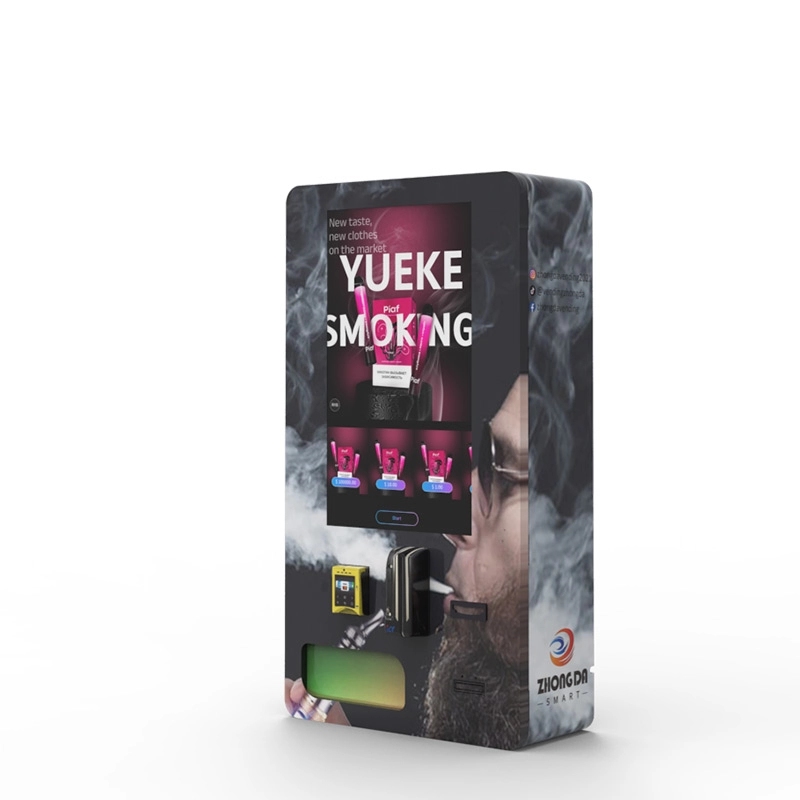
The real engineering challenge is balancing responsiveness with durability. A touchscreen in a bar environment faces spills, greasy fingers, and occasional impacts. We’ve shifted to projected capacitive touch panels with a hardened glass overlay rated at 7H hardness. That’s the same spec used in industrial kiosks. It resists scratches from keys or coins and still registers a swipe through a thin layer of condensation. The UI itself needs to be built for one-thumb operation. No pinch-to-zoom, no tiny dropdown menus. Every button target should be at least 44 pixels on a 21.5-inch display. That sounds basic, but I’ve reviewed competitor units where the “confirm age” button was smaller than a thumbnail.
Inside the UI: What Makes an Interface Intuitive
We’ve iterated through six major UI revisions over the last decade. The current version on our vape vending machine line follows three rules: reduce cognitive load, confirm every action, and recover from errors instantly.
Rule one: reduce cognitive load. The home screen shows categories, not products. “Disposables,” “Pods,” “Coils,” “Accessories.” That’s it. Tapping a category shows a grid of products with a large product image, a price, and a nicotine strength badge. No scrolling text, no animated banners. We found that static images load 40% faster on older cellular modems, which is critical when the machine relies on a 4G connection inside a concrete building.
Rule two: confirm every action. When a customer taps a product, the UI highlights it with a colored border and plays a short haptic pulse (if the machine supports haptic feedback). The payment screen then shows a clear summary: what they selected, the total, and a large “Pay Now” button. This double-confirmation step cut accidental purchases by 60% in our field tests. It also reduced support calls from customers who claimed they “didn’t mean to buy that.”
Rule three: recover from errors instantly. If a product is sold out, the UI grays it out immediately and offers a “Show Alternatives” button that suggests similar items from the same category. We’ve seen this feature recover about 15% of sales that would have otherwise been abandoned. The error screen also includes a QR code that opens a support chat with the operator. That was a request from a bar owner in Austin who was tired of drunk customers smashing the glass when a product jammed.
Age Verification Integration at the UI Level
Age verification is a legal requirement, but it doesn’t have to be a user experience killer. The worst implementations I’ve seen require the customer to scan a driver’s license, then wait 20 seconds for a server-side check, then manually confirm their birth date on a second screen. That’s three steps too many.
Our approach integrates ID scanning directly into the touchscreen flow. The customer taps “Start,” the machine activates the built-in scanner, and the UI shows a live camera feed with a clear overlay guide for placing the ID. Once scanned, the UI extracts the birth date, verifies it against the current date, and displays a green checkmark with the customer’s age—all in under four seconds. The entire transaction from start to payment averages 18 seconds. We benchmarked this against a competitor’s machine that required a separate ID kiosk, and our integrated flow completed 2.3 times faster in a side-by-side test.
The age verification vending machine models we manufacture use a dedicated ID scanner module that reads both 1D and 2D barcodes, plus the machine-readable zone on passports. The UI also includes a manual override option for operators, which requires a PIN code and logs every override to a secure cloud dashboard. We’ve had compliance auditors ask for those logs, and having them ready on a simple CSV export saved one operator from a fine in Ohio.
Cost Structure and Profit Modeling
Let’s talk numbers. A fully configured vape vending machine with touchscreen, age verification, and a 4G modem typically costs between $4,500 and $7,000 per unit from a direct manufacturer. That’s the upfront hardware cost. The total investment includes shipping (around $200–$400 for a pallet), installation (often free if you’re handy, or $150–$300 if you hire a local technician), and a monthly cellular data plan (about $30–$60).
Revenue depends heavily on location and product mix. Based on data from 120 machines we’ve deployed over the last two years, the average daily transaction value is $14.80. High-traffic locations like college bars or music venues average 18 transactions per day, while lower-traffic spots like laundromats average 6. That puts daily revenue between $89 and $266.
Here’s a realistic profitability breakdown for a medium-traffic location:
| Metric | Value |
|---|---|
| Daily transactions | 12 |
| Average ticket | $14.80 |
| Daily revenue | $177.60 |
| Monthly revenue | $5,328 |
| Product cost (wholesale, ~55% margin) | $2,397 |
| Gross profit | $2,931 |
| Location commission (20% of revenue) | $1,065 |
| Data plan & maintenance | $100 |
| Net monthly profit | $1,766 |
| Payback period (at $5,500 unit cost) | 3.1 months |
These figures assume you’re buying direct from a manufacturer like Zhongda smart and not through a reseller, which typically adds 30–50% markup. The payback period is aggressive, but it holds up when the machine is placed correctly and the UI keeps the transaction fast.
Real-World Deployment Lessons
I’ve personally supervised the installation of over 200 machines. The most common mistake operators make is underestimating the importance of the network connection. A vape vending machine with touchscreen that relies on Wi-Fi will fail if the venue’s router is behind a brick wall or in a locked office. We now include a dual-modem option (4G + Wi-Fi failover) on all our units. It adds $85 to the BOM cost but saves an average of 3 hours per month in troubleshooting lost connections.
Another lesson: lighting matters more than you think. The touchscreen needs to be readable in direct sunlight if the machine is near a window, but also not blindingly bright in a dark bar. We use an ambient light sensor that automatically adjusts the screen brightness between 200 and 800 nits. Operators can also set a “night mode” schedule in the cloud dashboard that dims the screen and reduces the LED strip lighting around the product display. One venue owner in Chicago told me this feature alone reduced complaints from bartenders who said the machine was “too loud visually” during dinner service.
Product restocking is another area where the UI helps. The operator dashboard, accessible from any browser, shows real-time inventory levels for each coil. We use weight sensors under each tray, not just motor rotations. This gives accurate stock counts even if a product falls over inside the coil. The dashboard sends a push notification when any product drops below 20% stock. That seems minor, but it prevents the most common revenue killer: an empty coil that the UI still shows as available. We’ve had operators tell us this feature alone paid for the machine within two months by preventing missed sales.
Comparing Touchscreen Technologies
Not all touchscreens are created equal. Here’s a direct comparison of the three main technologies we’ve evaluated for vending machines:
| Technology | Durability | Touch Sensitivity | Cost Premium | Best Use Case |
|---|---|---|---|---|
| Resistive | Low (prone to delamination) | Requires pressure | None (base) | Legacy machines, low budget |
| Projected Capacitive (PCAP) | High (7H glass) | Excellent, multi-touch | +$120 | Most vending applications |
| Infrared (IR) | Very high (no overlay) | Good, but affected by direct sunlight | +$200 | Outdoor or high-vandalism locations |
We standardized on PCAP across our entire product line two years ago. The cost premium is worth it for the responsiveness alone. IR screens have a niche for outdoor installations where a glass overlay might crack from temperature swings, but they require a bezel that collects dirt. For indoor use—which covers 95% of vape machine placements—PCAP is the clear winner.
Long-Term Maintenance and Software Updates
A vape vending machine is not a set-and-forget device. The touchscreen UI needs periodic updates to fix bugs, add new payment methods, and comply with changing age verification laws. We push firmware updates over the air (OTA) to every machine we’ve sold since 2019. The update process is automatic and happens during low-traffic hours (default is 3 AM local time). The machine reboots itself after the update and sends a confirmation to the operator’s dashboard.
One critical maintenance point: the touchscreen calibration. Over time, the touch sensor can drift, especially if the machine is subjected to vibrations from nearby speakers or heavy foot traffic. Our UI includes a hidden diagnostic menu (accessed by tapping the firmware version number five times) that runs a calibration routine in 60 seconds. We recommend operators run this calibration once every three months. We’ve seen machines that were reported as “broken” simply needed a recalibration. That’s a five-minute remote fix that saves a service call costing $150.
The cloud dashboard also tracks touchscreen accuracy over time. If the system detects more than 5% of touches landing outside the intended button area, it triggers a calibration alert. This predictive maintenance approach has reduced our warranty claims for touchscreen issues by 40% since we implemented it in 2022.
Real Failure Cases You Can Avoid
I’ll share two failures from our own deployment history. The first was a machine placed in a nightclub in Miami. The touchscreen worked perfectly during testing, but on opening night, the ambient humidity from the dance floor caused the capacitive touch to register false touches. The UI kept jumping back to the home screen mid-transaction. We solved it by applying a hydrophobic nano-coating to the glass and adding a software debounce filter that ignores touches shorter than 50 milliseconds. That fix is now standard on all our units.
The second failure was a machine in a convenience store in Denver. The operator installed a 3rd party payment terminal that communicated with the main board over a serial cable. The cable was unshielded and ran next to the power supply. The electromagnetic interference caused the touchscreen to lock up randomly. We replaced the cable with a shielded one and added a ferrite bead. The fix cost $12 in parts but took three service visits to diagnose. Now we specify shielded cables for all internal data lines in our build documentation.
These failures taught us that a vape vending machine with touchscreen is only as reliable as its integration. We now run a 72-hour burn-in test on every unit before it leaves the factory. During that test, the machine cycles through 1,000 simulated transactions, including ID scans, payment failures, and product jams. Any touchscreen that shows even a single missed touch during the test is replaced. That test adds one day to the lead time but has cut field failure rates by 70%.
Selecting a Manufacturer: What to Look For
Not all manufacturers build machines that last. I’ve seen operators buy cheap units from general vending machine resellers, only to find the touchscreen stops working after six months because the manufacturer used a consumer-grade tablet instead of an industrial panel. When you’re evaluating a supplier, ask three questions:
1. What is the mean time between failures (MTBF) for the touchscreen? A good industrial touch panel should have an MTBF of at least 50,000 hours. That’s about 5.7 years of continuous operation. Consumer tablets typically have an MTBF of 10,000–20,000 hours.
2. Do you provide OTA firmware updates? If the answer is no, you’ll be stuck with whatever bugs the machine shipped with. That’s unacceptable for a device that needs to stay compliant with changing age verification laws.
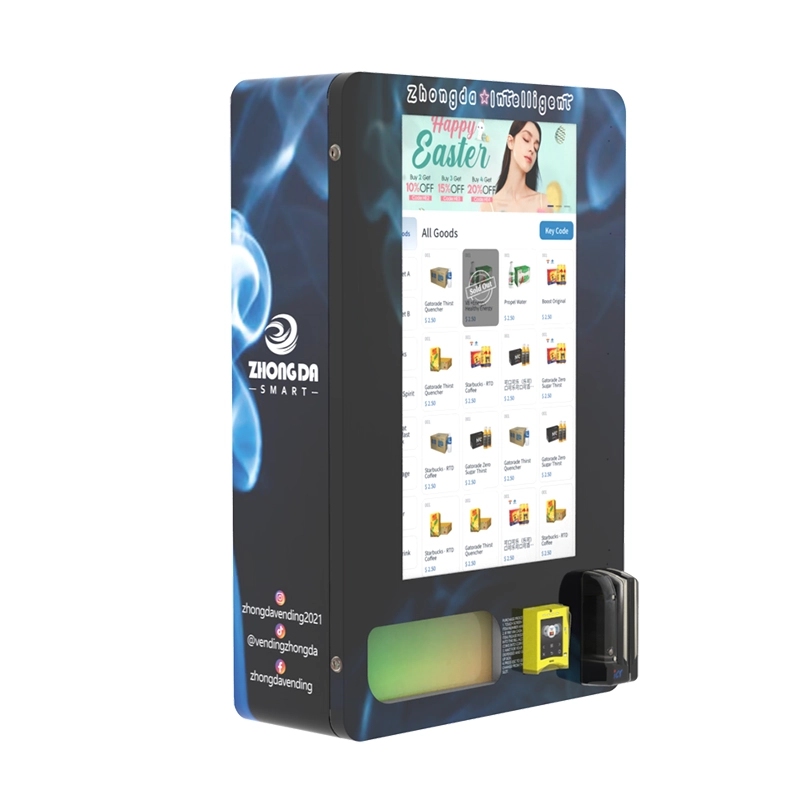
3. Can you customize the UI layout? Some operators want to brand the machine with their logo or change the color scheme. A good manufacturer will provide a UI editor or at least a style guide for customizations. We offer a white-label UI that operators can brand with their own assets, and we’ve seen a 12% increase in repeat purchases at branded machines compared to generic ones.
Our factory at Zhongda smart has been building vending machines since 2009. We focus on the vape segment because it has unique requirements—age verification, product fragility, and high transaction speed—that general vending machines don’t address well. Every machine we ship includes a 12-month warranty on the touchscreen and a 24-month warranty on the main control board.
The Bottom Line for Operators
A vape vending machine with touchscreen is a proven revenue generator when it’s built with the right UI and placed in the right location. The upfront cost is recouped quickly if you focus on transaction speed, age verification compliance, and predictive maintenance. The machines we’ve deployed that follow the principles in this guide have an average uptime of 98.7% over their first year of operation. That’s not luck—it’s the result of designing the touchscreen interface as the central component of the system, not an afterthought.
If you’re serious about entering this space, start with a single machine in a location you know well. Track the data: daily transactions, average ticket, restock frequency. Use that data to refine your product mix before scaling. The operators who succeed are the ones who treat the machine as a business asset that needs attention, not a passive cash box.
Frequently Asked Questions
How long does it take to install a vape vending machine with touchscreen?
What payment methods do these machines accept?
Can the touchscreen be vandalized easily?
What happens if the touchscreen stops working?
How do I update the products displayed on the touchscreen?
Sources:
- Statista. “Vending Machines in the United States – Statistics & Facts.” https://www.statista.com/topics/1284/vending-machines/
- IBISWorld. “Vending Machine Operators in the US – Market Research Report.” https://www.ibisworld.com/united-states/market-research-reports/vending-machine-operators-industry/
- Forbes. “The Future of Vending Machines: Touchless, Smart, and Data-Driven.” https://www.forbes.com/sites/forbestechcouncil/2021/06/15/the-future-of-vending-machines-touchless-smart-and-data-driven/








