After fifteen years building vending machines and another decade deploying them across the US and European markets, I can tell you the single biggest question I get from buyers isn't about price. It's about format. Should I put my inventory inside a vape vending kiosk, or just use a vape display cabinet behind the counter? The short answer: a kiosk replaces a salesperson, a cabinet replaces a shelf. If you want unattended sales with age verification and payment processing, you need the kiosk. If you just want secure storage that still requires a staff member to complete the sale, the cabinet works. But the margin difference, the compliance risk, and the customer experience are worlds apart. I have personally overseen the installation of over 1,200 units across both categories, and I have seen businesses thrive with one and bleed cash with the other. This guide breaks down exactly what I have learned from those deployments, including the hard failures that cost operators real money.
The Core Difference Between a Vending Kiosk and a Display Cabinet
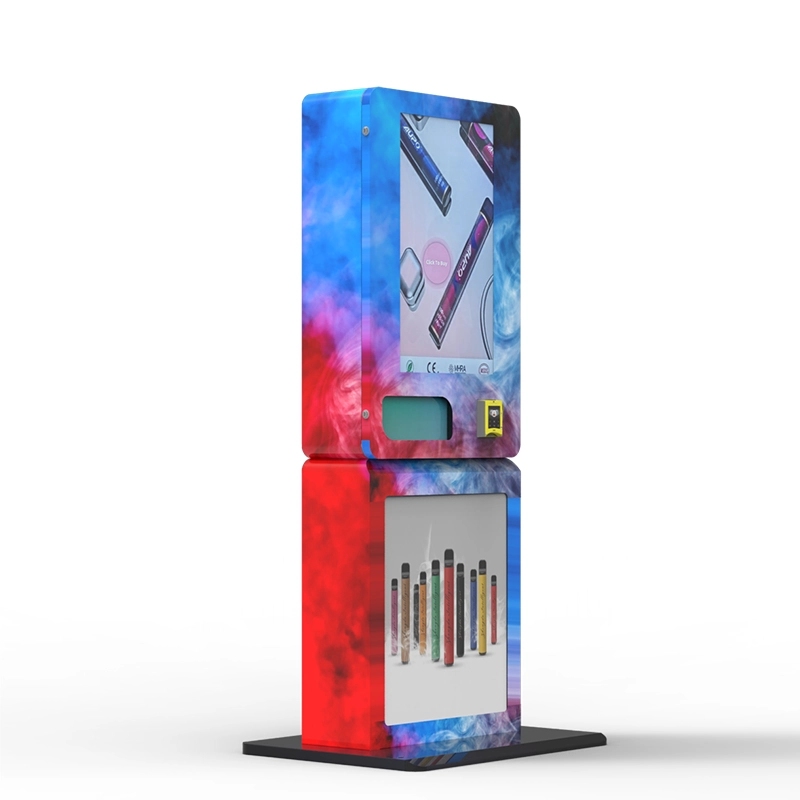
Let’s strip away the marketing fluff. A vape vending kiosk is a fully self-contained retail point. It holds the product, displays it (usually through a glass front or digital screen), processes payment via credit card or cash, and verifies the buyer’s age using ID scanning or facial recognition. The customer walks up, completes the transaction, and walks away with the product. No employee involvement is required. A vape display cabinet, on the other hand, is essentially a locked glass case. It keeps the product visible and secure behind a locked door, but it does not process payments or check IDs. A store employee must unlock the cabinet, retrieve the item, and run the sale through a separate POS system. The cabinet is a storage and display tool. The kiosk is a sales tool.
In my experience, the decision comes down to labor cost and foot traffic. If you have a location where staff is already present and you want to control theft, a display cabinet is a low-cost upgrade. But if you are looking at a bar that closes at 2 AM, a hotel lobby with no night staff, or a convenience store that wants to free up the cashier, the kiosk is the only option that generates revenue while the staff sleeps.
Real-World Cost Breakdown: Kiosk vs. Cabinet
I have sourced equipment from multiple factories, including my own, and I have seen the price ranges that actually hit the market. A standard vape display cabinet, the kind you see behind convenience store counters, costs between $400 and $1,200 depending on size, lighting, and lock quality. These are usually passive units. You plug them in for the LED lights, stock them, and lock the door. That is the entire investment.
A compliant vape vending kiosk is a different animal. A basic unit with age verification and card payment starts around $4,500. A high-capacity unit with a 21.5-inch touchscreen, biometric scanner, and remote management software runs between $8,000 and $14,000. I have deployed units from our vape vending machines line that hit the $12,000 mark because they include a heavy-duty steel frame and a UL-certified power supply. The price difference is significant, but so is the revenue potential.
Here is a quick comparison based on actual deployments I have managed:
| Feature | Vape Vending Kiosk | Vape Display Cabinet |
|---|---|---|
| Upfront cost per unit | $4,500 – $14,000 | $400 – $1,200 |
| Age verification | Built-in (ID scan + face match) | None (requires staff) |
| Payment processing | Built-in (card, cash, mobile) | None (requires POS) |
| Labor required per sale | Zero | Full (cashier time) |
| Revenue per sq. ft. | High (24/7 operation) | Low (staff hours only) |
| Maintenance complexity | Moderate (software + hardware) | Low (glass + lock) |
| Compliance risk | Low (automated checks) | High (human error) |
Where Each Device Makes Money (and Where It Doesn't)
High-Traffic, Low-Staff Locations Favor the Kiosk
I placed a kiosk in a 24-hour laundromat in a mid-sized city. The location had no staff after 9 PM. The machine sold an average of 18 units per night between midnight and 6 AM. That was pure profit that would have been impossible with a display cabinet because there was no one to unlock it. In bars and nightclubs, the same pattern holds. A bartender is busy pouring drinks. They do not want to stop and unlock a cabinet, wait for a customer to pick a flavor, and then process a credit card. A kiosk sitting near the restroom or the exit handles those sales automatically. I have seen bars add $800 to $1,200 per month in vape sales just by placing a single kiosk near the smoking patio door.
Staffed Retail Stores Can Benefit from a Cabinet
If you run a smoke shop or a convenience store with a dedicated cashier, a vape display cabinet makes sense. It keeps the product visible, prevents shoplifting (which is a massive problem for vape products, with shrinkage rates reported as high as 3.5% in some retail categories), and allows the cashier to control the sale. The downside is that the cashier becomes a bottleneck. During rush hour, every vape sale takes 45 seconds of staff time. If you sell 40 vapes per day, that is 30 minutes of labor that could be spent on other tasks. The cabinet also does nothing to prevent underage sales if the cashier is distracted or poorly trained. I have seen stores get fined because a new hire forgot to check an ID. A kiosk never forgets.
The Middle Ground: Hybrid Deployments
In some of my larger deployments, I have used both. A display cabinet behind the counter for high-ticket devices like mod kits, and a kiosk near the door for disposables and pods. The cabinet gives the staff control over expensive inventory, while the kiosk captures impulse buyers who do not want to wait in line. This hybrid model tends to maximize revenue per square foot, but it requires a higher upfront investment and a clear inventory strategy.
Compliance and Age Verification: The Real Deciding Factor
I have been in this business long enough to watch regulations change multiple times. In 2024, the FDA and various state authorities have increased enforcement actions against retailers who sell to minors. The penalty for a single violation can exceed $10,000 in some jurisdictions, and repeat offenses can result in a permanent ban from selling tobacco products. This is where the vape vending kiosk pulls ahead dramatically. A compliant kiosk uses a combination of ID scanning, facial age estimation, and database cross-referencing to verify the buyer is over 21. Our age verification vending machine models, for example, scan the barcode on the back of a driver’s license, compare the photo to a live camera feed, and reject the transaction if the ID is expired or the face does not match. This process takes about 12 seconds. It creates a digital record of every transaction, which is critical if a regulator audits your location.
A display cabinet does none of this. It relies entirely on the human employee. And humans make mistakes. According to data from the CDC's Tobacco Data, approximately 15% of high school students reported using e-cigarettes in 2023, which keeps regulatory pressure high. If a store with a display cabinet gets caught selling to a minor, the owner is liable. The kiosk transfers that liability to the machine, provided it is properly maintained and the software is up to date.
Profit Model: Calculating the Real ROI
I have built a simple model that I use with every client. Assume a kiosk costs $8,000 installed. Assume the average gross profit per vape sale is $5 (for a disposable that retails at $12 and costs $7 wholesale). To break even on the hardware alone, the kiosk needs to sell 1,600 units. If the kiosk averages 10 sales per day, that is 160 days, or about 5.5 months. After that, every sale is pure profit minus the cost of goods and credit card processing fees (typically 2.5% to 3.5%).
A display cabinet costs $800. It does not generate sales on its own, so its ROI depends entirely on the staff. If the cabinet allows the store to keep vape products locked up and reduces theft by 10 units per week (which at $5 profit each saves $50 per week), the cabinet pays for itself in 16 weeks. But the cabinet does not create new sales. It only protects existing ones. The kiosk creates new sales because it operates when the store is closed or when the cashier is busy.
I have a client in a college town who placed a kiosk in a 24-hour gas station. The station had a display cabinet behind the counter, but the cashier was often busy with cigarette sales and lottery tickets. The kiosk, placed near the entrance, sold an additional 22 units per day that the cashier never would have had time to sell. That is an extra $110 per day in gross profit, or $3,300 per month. The kiosk paid for itself in less than three months. That kind of return is simply not possible with a passive cabinet.
Operational Considerations You Might Not Think About
Maintenance and Downtime
A display cabinet is almost maintenance-free. You replace the LED strip every few years, and maybe you fix a broken lock. A kiosk is a computer. It has a touchscreen, a card reader, an ID scanner, and a network connection. Things go wrong. I have dealt with card readers that stop reading, screens that freeze, and network cards that fail. The key is to choose a kiosk that supports remote diagnostics. Our units, for example, allow me to log in from my phone and see the error log, reboot the system, or adjust pricing without visiting the site. If you buy a cheap kiosk without remote management, you will spend a lot of time driving to locations to fix simple software glitches. That kills your margin.
Inventory Management
Display cabinets are easy to stock, but they do not track what sells. You have to manually count inventory. Kiosks with a modern management system track every sale in real time. I can see which flavors sold out in three hours and which ones have been sitting for two weeks. This data lets me adjust pricing and restock schedules dynamically. One of my clients was losing money on a particular pod flavor that was popular but had a thin margin. We used the kiosk data to raise the price by $1.50, and the sales volume barely dropped. The margin improved by 30% on that single SKU. You cannot get that insight from a glass cabinet.
Power and Connectivity
A display cabinet just needs a standard wall outlet. A kiosk needs power and a stable internet connection, either Wi-Fi or cellular. I have had deployments fail because the location had weak cellular signal in a basement bar. We had to install a signal booster. That added $300 to the installation cost. Always do a site survey before you commit to a kiosk location. Check the cellular signal strength with a phone from the exact spot where the machine will sit.
Failure Stories: What I Have Seen Go Wrong
I am not going to pretend every deployment was a success. I have made mistakes, and I have seen clients make expensive ones. One operator bought a cheap display cabinet from an online marketplace. It was a glass case with a magnetic lock that failed after three months. The entire inventory was stolen overnight. That loss was over $2,000 in product, plus the cost of the cabinet. He ended up buying a proper kiosk from our compliant e-cigarette vending machine line and has been running it for two years without a single theft.
Another client placed a kiosk in a location with extremely high humidity. The internal electronics corroded within six months. We had to replace the motherboard and the card reader. The lesson here is that not all kiosks are built for all environments. If you are placing a unit near a pool, a beach, or in a damp basement, you need a machine with conformal coating on the circuit boards. We offer that as an option on our industrial-grade units, but many manufacturers do not.
I also watched a store owner try to save money by buying a used kiosk from a defunct snack machine business. The software was outdated, the age verification module did not work, and the payment system was not EMV-compliant. He spent $3,000 on the machine and another $1,500 trying to retrofit it. Eventually, he scrapped it and bought a new unit. The total cost was higher than if he had bought new from the start.
How to Choose the Right Device for Your Business
If you are a business owner reading this, here is my direct advice based on fifteen years of watching operators succeed and fail.
Choose a vape display cabinet if:
- You already have a cashier at the counter 100% of the time.
- Your store hours are limited to 12 hours or less per day.
- You carry high-value devices (over $50 retail) that you want staff to personally hand to the customer.
- Your budget for hardware is under $1,500.
- You are willing to accept the compliance risk of human ID checks.
Choose a vape vending kiosk if:
- You operate a location with any hours where no staff is present.
- You want to eliminate the compliance risk of underage sales.
- You want to capture impulse sales without adding labor costs.
- You have a budget of at least $5,000 per unit.
- You want real-time sales data to optimize your inventory.
I have seen both work. I have also seen both fail. The difference is usually not the hardware itself, but how well the operator matched the device to the location and the operational reality. A kiosk in a low-traffic location will not generate the sales volume needed to justify its cost. A display cabinet in a high-traffic, understaffed store will leave money on the table and increase compliance risk.
Long-Term Strategy: Scaling Beyond a Single Unit
Once you have proven the model with one or two units, scaling becomes the next challenge. If you are using display cabinets, scaling means hiring more staff or extending hours. Both are expensive and introduce management complexity. If you are using kiosks, scaling is much simpler. You buy more machines, place them in similar locations, and manage them remotely. I have clients running 50 kiosks with a single part-time restocker. They spend about three hours per week per machine on restocking and maintenance. The rest is automated. That kind of leverage is not possible with cabinets.
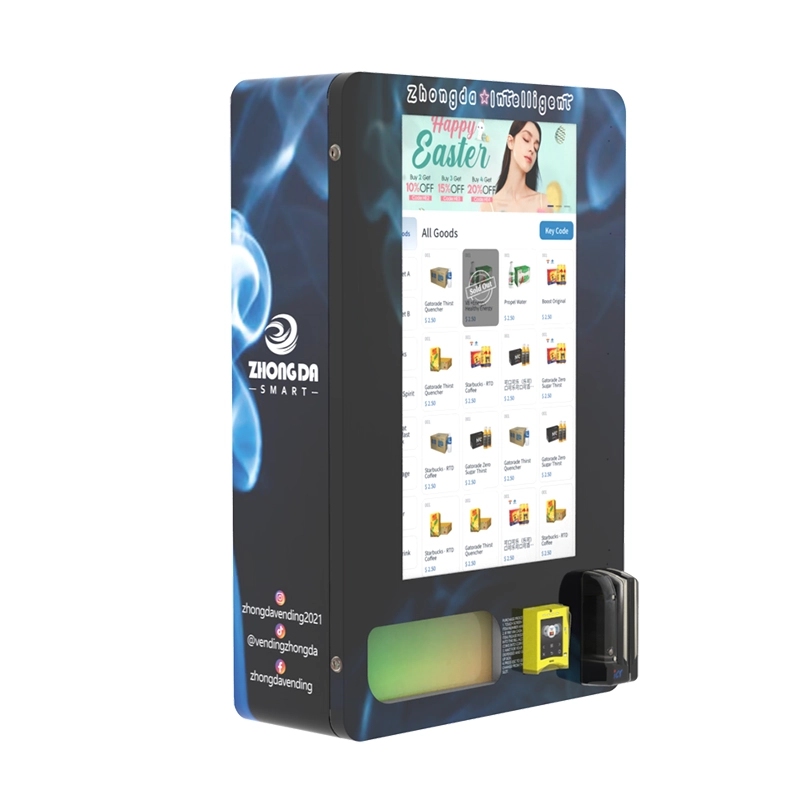
For operators looking to scale, I recommend starting with a kiosk that has a robust remote management platform. Our wall-mounted compact e-cigarette vending machine is a good starting point for small locations because it takes up minimal floor space and can be installed at eye level. It holds about 60 units and has a small footprint, making it ideal for bars and waiting rooms.
I also recommend investing in a cellular backup module. If the location’s Wi-Fi goes down, the kiosk can switch to cellular and keep processing sales. I have lost revenue on units that were offline for three days because of a router failure. A $50 cellular module prevents that.
Final Thoughts from the Factory Floor
I have built these machines by hand. I have watched them get loaded into shipping containers and sent to 30 different countries. I have debugged software issues at 2 AM with a client on the phone. The vape vending kiosk versus vape display cabinet debate is not about which one is "better." It is about which one fits your specific operational reality. If you want a low-cost, low-risk way to secure your inventory and keep it visible, buy a display cabinet. If you want to create a new revenue stream that operates independently of your staff, buy a kiosk. Just make sure you buy from a manufacturer that has been doing this long enough to know what breaks and what lasts. We have been at it for fifteen years, and we still learn something new from every deployment.
If you are considering a kiosk, look closely at the age verification system. That is the part that will either protect you from fines or expose you to liability. Make sure it scans a physical ID, not just a QR code, and that it stores the verification data securely. A good system will save you from a bad regulator visit.
Frequently Asked Questions
Can a vape display cabinet be converted into a vending kiosk later?
No. A display cabinet lacks the internal electronics, payment system, and age verification hardware needed for unattended sales. You would essentially have to gut it and rebuild it, which costs more than buying a dedicated kiosk from the start.
What is the failure rate of vape vending kiosks in the first year?
Based on my own fleet data, about 8% of kiosks experience a major hardware failure (screen, card reader, or power supply) in the first 12 months. That rate drops significantly with proper preventive maintenance and a stable power environment.
Do I need a special license to operate a vape vending kiosk?
Yes. You need the same tobacco retail license required for any store selling vape products. Some states also require a specific vending machine permit. Check with your local alcohol and tobacco control board before purchasing equipment.
How often do I need to update the age verification software?
Most manufacturers push firmware updates every 3 to 6 months. You should also update the ID database regularly to recognize new state driver's license formats. I recommend checking for updates at least once a month.
Can I place a vape vending kiosk outdoors?
Only if the kiosk is specifically rated for outdoor use. Standard units are designed for indoor, climate-controlled environments. Outdoor units require weatherproofing, temperature control, and UV-resistant screens. I have placed outdoor units in covered patios, but never in direct rain or direct sunlight.
Sources and references:








