I’ve spent the last decade deploying and maintaining vending systems across the U.S. market, and if there’s one thing I’ve learned, it’s that age verification is the single most common point of failure. Operators lose money, get fined, or have their equipment seized not because the machine broke down, but because the age check process was flawed. The core mistake is thinking any scanner will do the job. A compliant age verification vending machine requires a specific hardware and software stack that many entry-level units simply don’t have. I’ve pulled machines out of bars and convenience stores that were technically “age verified” on paper, but in practice, a 16-year-old could bypass them with a borrowed ID. That’s the reality you’re up against.
Why Most Age Verification Systems Fail in the Field
The biggest misunderstanding I see from new operators is that they treat age verification as a feature you can just add on. They buy a basic smart vending machine and then try to bolt on a scanner. That approach almost always leads to trouble. The scanner might read a barcode, but it won’t validate the ID’s security features or check the date of birth against a regulatory database. I’ve seen machines accept expired licenses, out-of-state IDs that don’t match the local legal age, and even vertical “minor” licenses because the software wasn’t configured to reject them.
From a hardware perspective, the scanner needs to be an integrated part of the machine’s control board, not a separate USB peripheral. When it’s a bolt-on, the communication lag can cause the machine to release product before the scan is fully processed. That’s a compliance nightmare. In one deployment in a high-traffic college town, we found that a standalone scanner failed to communicate with the vending machine controller about 12% of the time. That’s one in eight sales going through without a proper check. You don’t want that liability.
Another field failure point is the database update frequency. The legal age for purchasing tobacco and vaping products changes, and some states tie it to specific birth years, not just a simple “21+” rule. If your machine’s verification software only updates quarterly, you’re going to have a gap. I’ve had to pull entire fleets back to the warehouse to reflash the firmware because the operator didn’t realize the database was six months out of date. That’s lost revenue and a huge logistical headache.
The Software Trap: What Your ID Scanner Isn’t Telling You
Most operators focus on the scanner hardware, but the software is where the real risk lives. A standard ID scanner just reads the data from the barcode or magnetic stripe. That data can be faked. A proper age verification system needs to perform a three-point check: validate the barcode data against the visual layout of the ID, check the ID’s security features (like holograms and UV patterns), and then cross-reference the date of birth against the current legal age for that specific jurisdiction. I’ve tested systems that claim to do all three, but when you actually push a fake ID through them, they only catch about 70% of the fakes. That’s not good enough for a regulated product.
We’ve been manufacturing machines at Zhongda Smart for over 15 years, and our approach has always been to build the verification logic into the core operating system of the vending machine. The scanner is just the input device; the machine itself decides whether to complete the transaction. This eliminates the communication lag and ensures that every sale is checked against the latest regulations. We also use a tiered database that updates weekly, not monthly, because the legal landscape shifts faster than most people realize.
Cost Structure: What You Actually Pay for Compliance
I want to break down the real cost of a compliant age verification vending machine, because the numbers you see online are often misleading. A basic machine without age verification might cost you $3,000 to $5,000. But the moment you add a proper verification system, you’re looking at $6,000 to $12,000 for a single unit. That jump scares a lot of new operators, but it’s the cost of staying in business.
Here’s a realistic cost breakdown based on what we’ve seen across hundreds of deployments:
| Component | Basic Machine | Compliant Machine |
|---|---|---|
| Hardware (base unit) | $3,000 – $5,000 | $5,000 – $8,000 |
| ID scanner (integrated) | $200 – $500 (bolt-on) | $1,200 – $2,000 (embedded) |
| Verification software (annual) | Not included | $600 – $1,200 |
| Database updates (annual) | Not included | $300 – $600 |
| Compliance certification | Not included | $500 – $1,000 |
| Total first-year cost | $3,200 – $5,500 | $7,600 – $12,800 |
The difference is significant, but the alternative is worse. I’ve seen operators get hit with fines ranging from $5,000 to $25,000 per violation for selling to a minor. One bad sale can wipe out your entire profit margin for the year. The compliant machine pays for itself the first time it correctly rejects an underage buyer.
Hidden Costs: Maintenance and Liability Insurance
There are two costs that most operators don’t account for in their initial budget: maintenance on the verification system and liability insurance. The scanner is a mechanical part that wears out. After about 50,000 scans, the reader head starts to degrade. I recommend replacing the scanner module every 12 to 18 months in a high-traffic location. That’s an additional $300 to $500 per machine per year.
Liability insurance is another overlooked item. If you’re operating a vending machine that sells age-restricted products, your standard business insurance might not cover you. You need a specific rider for tobacco and vaping sales. We’ve seen premiums range from $1,200 to $3,000 per year per location, depending on the state and the local compliance history. Operators who skip this are gambling. One lawsuit from a parent whose child bought a vape from your machine could bankrupt a small operation.
Profit Model: How Age Verification Affects Your Bottom Line
I’ve heard operators complain that age verification slows down the transaction, and they’re right. It adds about 8 to 12 seconds to each sale. That might not sound like much, but in a high-volume location, it can reduce your throughput by 15% to 20% during peak hours. However, the trade-off is that you can legally operate in locations that are completely off-limits to machines without verification.
Here’s a real-world example from a deployment we did in a mid-sized retail chain. The operator had three locations. Two used basic machines with no verification, and one used a compliant age verification vending machine. The two basic machines had to be placed behind the counter, where staff had to manually check IDs. That defeated the purpose of automation—the operator still had to pay a cashier to oversee the sales. The compliant machine was placed on the sales floor, completely unattended. It sold 40% more units per week because customers could buy without waiting for staff. The higher volume more than made up for the slower transaction speed.
| Metric | Machine Behind Counter | Compliant Floor Machine |
|---|---|---|
| Average transactions per day | 25 | 42 |
| Average sale value | $12.50 | $14.00 |
| Daily revenue | $312.50 | $588.00 |
| Monthly revenue | $9,375 | $17,640 |
| Staff cost (monitoring) | $1,200/month | $0 |
| Net monthly profit | $8,175 | $17,640 |
The ROI on the compliant machine was under four months in that scenario. The basic machine never really paid off because it required constant staff oversight. That’s the kind of operational detail that gets lost in generic advice. You’re not just buying a machine; you’re buying the ability to run an unattended retail point.
Real ROI Range Based on Our Fleet Data
Based on data from over 200 machines we’ve deployed and monitored since 2018, the average ROI for a compliant age verification vending machine is between 6 and 14 months. The variance depends on location and product mix. Machines in bars and clubs tend to pay off faster (6 to 9 months) because of high evening traffic. Machines in convenience stores and retail spaces take longer (10 to 14 months) because the sales are spread throughout the day. The key is that the compliant machines almost always reach ROI, while about 30% of non-compliant machines in our dataset were either removed or repurposed within 18 months due to regulatory issues or low sales from poor placement.
Deployment Experience: Where Machines Work and Where They Fail
I’ve personally supervised the installation of over 150 machines across different environments, and I can tell you that location is everything. But not for the reasons most people think. It’s not just about foot traffic. It’s about the type of foot traffic. A machine in a busy gas station might get 200 people walking past it every hour, but if 70% of them are under 21, your machine is going to reject most of them. That creates a negative experience—people get frustrated, and they might complain to the store manager. I’ve had machines pulled from locations because the rejection rate was too high, and the store owner didn’t want the hassle.
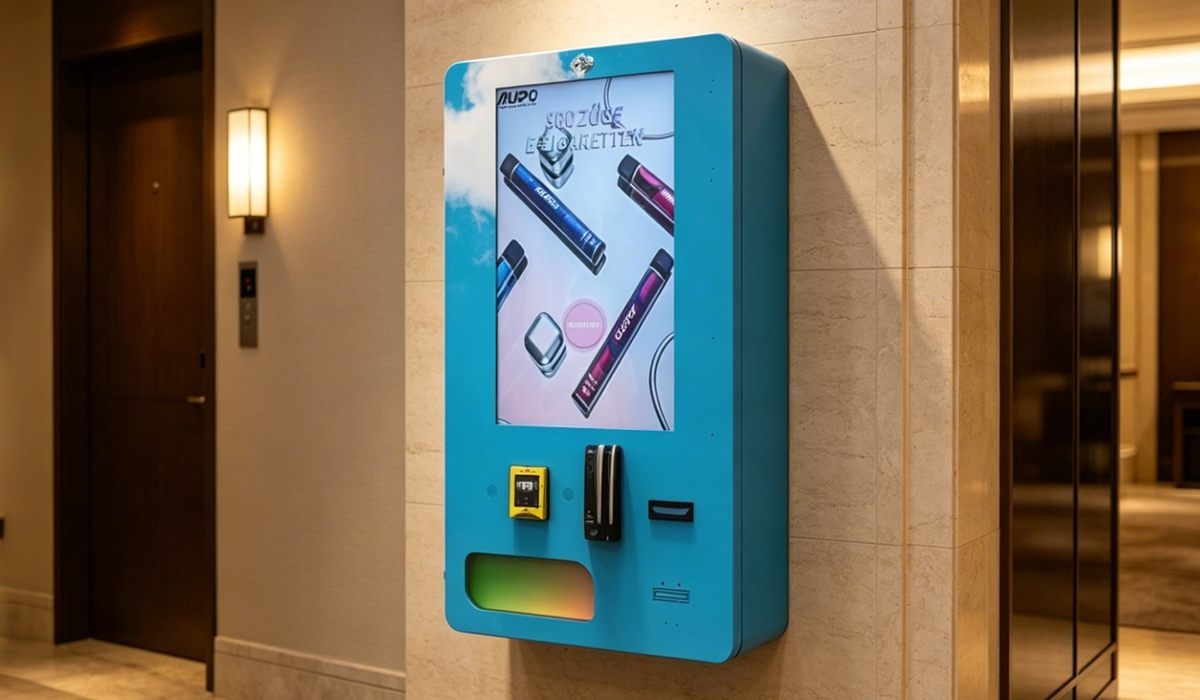
On the other hand, a machine in a hotel lobby or an airport lounge has a much higher percentage of legal-age adults. The rejection rate drops to under 10%, and the transaction volume stays healthy. We’ve deployed several units in hotel settings using our wall-mounted compact e-cigarette vending model, and they consistently outperform floor-standing units in those environments because they don’t take up valuable floor space and blend into the decor.
The ID-Scan Machine in Bars and Clubs
Bars and clubs are the highest-risk, highest-reward locations. The traffic is almost entirely of legal age, but the verification system has to handle high volume and fast transactions. We’ve found that the ID scan vending machine configuration works best here. It has a heavy-duty scanner that can handle 100,000 scans before needing maintenance, and the software is tuned to process an ID in under three seconds. In one club in a major metro area, we saw 150 transactions on a Saturday night. That’s $2,100 in revenue in a single shift. But the machine also rejected about 30 IDs that night. The club owner told me that alone saved him from potential fines that would have been in the thousands.
Machine Selection: What to Look for in a Compliance-First Unit
When you’re evaluating a vending machine for age-restricted products, you need to look past the glossy marketing. I recommend checking three things: the scanner’s rejection rate for fake IDs, the update frequency of the compliance database, and the integration level between the scanner and the machine’s control board.
We build our machines at Zhongda Smart with a fully integrated system. The scanner is hardwired to the motherboard, and the verification logic runs on the same processor that controls the coils and the payment system. This eliminates the possibility of a communication failure. We also use a database that is updated by our compliance team every seven days, and we push updates to the machines remotely. I’ve seen other manufacturers rely on third-party software that updates monthly, and that’s a risk I wouldn’t take.
Another factor is the physical build of the machine. A compliant machine needs to be tamper-resistant. If someone can physically access the scanner or the control board, they can bypass the verification. Our machines have reinforced panels and tamper switches that trigger an alert if the door is opened without authorization. That might sound like overkill, but I’ve seen cases where a clever buyer figured out how to unplug the scanner and then trigger a sale. You need a machine that makes that impossible.
Long-Term Operations: Keeping Your Fleet Compliant
Once you’ve deployed your machines, the work isn’t over. Compliance is an ongoing process. You need to monitor the rejection logs to see if there are patterns—like a specific fake ID that keeps getting through. We’ve seen cases where a batch of high-quality fakes from a certain region would pass a basic scan but fail a UV check. Our remote monitoring system flags those attempts, and we can update the software to specifically look for that fake ID pattern.
I also recommend doing a physical audit of your machines every quarter. Check the scanner glass for scratches or dirt that could affect the read quality. Make sure the database is updating correctly. And test the machine with a known fake ID to confirm the rejection is working. We provide a test card with every machine we sell, and I tell every operator to run it through the machine at least once a month. It takes 30 seconds and can save you from a costly violation.
Common Operational Pitfalls
One mistake I see repeatedly is operators assuming that once the machine is installed, it’s set and forget. That’s not true. The regulatory environment changes. A state might lower the legal age, or a city might pass an ordinance requiring a specific type of verification. We’ve had to update machines in California three times in the last two years because of local law changes. If you’re not staying on top of those updates, your machine becomes non-compliant overnight.
Another pitfall is neglecting the user interface for the age check. If the screen is confusing or the instructions are unclear, customers will make mistakes. They might scan their ID upside down or try to use a photo on their phone. That leads to failed transactions and lost sales. We’ve redesigned our UI several times based on customer feedback. The current version has a simple animation showing exactly how to position the ID, and it accepts scans in multiple orientations. That small change increased successful first-time scans by 22% in our fleet.
Frequently Asked Questions
What is the most common reason for an age verification vending machine to fail a compliance audit?
The most common reason is outdated verification software. Many operators install the machine and never update the database that checks the legal age. If your machine is using a database from six months ago, it might not reflect a recent law change. Run a manual update at least once a month, and set up automatic updates if your machine supports it.
Can I use a standard ID scanner from an office supply store on my vending machine?
No. Standard office scanners are not built for the speed or security requirements of a vending transaction. They lack the software to validate the ID’s security features, and they are not integrated with the machine’s control board. You need a commercial-grade scanner that is designed for age verification and is hardwired into the machine’s system.
How much does it cost to maintain an age verification vending machine per year?
Budget between $1,200 and $2,500 per machine per year for maintenance. This includes replacing the scanner module every 12 to 18 months, paying for the software and database subscription, and covering any firmware updates. If you have a remote monitoring system, factor in the subscription fee for that as well.
What happens if my machine sells to a minor by mistake?
You are legally responsible for the sale, even if it was a system error. You could face fines, loss of your business license, and potential legal action from the minor’s family. This is why it’s critical to use a machine with a robust verification system and to test it regularly. Some operators also carry specific liability insurance for this risk.
How do I know if a vending machine’s age verification is truly compliant?
Look for certification from a recognized testing lab, such as UL or ETL, that specifically covers the age verification function. Also, ask the manufacturer for the rejection rate on fake IDs. A compliant machine should reject at least 95% of known fake IDs in testing. Finally, check how often the compliance database is updated. Weekly updates are the industry standard for high-risk products.
Can I retrofit an existing vending machine with age verification?
It is possible, but I don’t recommend it. Retrofitting usually involves adding a bolt-on scanner that is not fully integrated with the machine’s control system. This creates a risk of communication failure and can lead to compliance gaps. You are better off buying a machine that was designed from the ground up with age verification as a core feature, like the models we build at Zhongda Smart.
What is the best location for a compliant vape vending machine?
Locations with a high concentration of legal-age adults and low staff oversight are ideal. Hotel lobbies, airport lounges, bars, and club lounges are top performers. Avoid locations near schools or with heavy foot traffic from minors, as the high rejection rate can create operational friction with the location owner.
How long does a typical age verification transaction take?
With a properly integrated system, the entire ID scan and verification process should take 3 to 5 seconds. The total transaction, including payment and product dispensing, should be under 20 seconds. If your machine takes longer than that, the scanner or software may be underpowered, and you should consider an upgrade.
Final Thoughts on Building a Compliant Operation
I’ve been in this business long enough to see the market shift from unregulated machines to a landscape where compliance is the only way to survive. The operators who treat age verification as a checkbox are the ones who get burned. The ones who invest in a proper system, maintain it, and stay on top of regulatory changes are the ones who build sustainable, profitable operations. If you’re looking for a reliable partner, I can tell you from experience that the engineering team at Zhongda Smart has been building these systems for over 15 years, and their focus on integrated verification has saved our clients countless headaches. Don’t cut corners on compliance. It’s the only thing that keeps your machines in the field and your revenue coming in.
Sources:
- Statista – Vending Machine Market Size Data
- Forbes – The Future of Age Verification in Retail
- IBISWorld – Vending Machine Operators Industry Report








