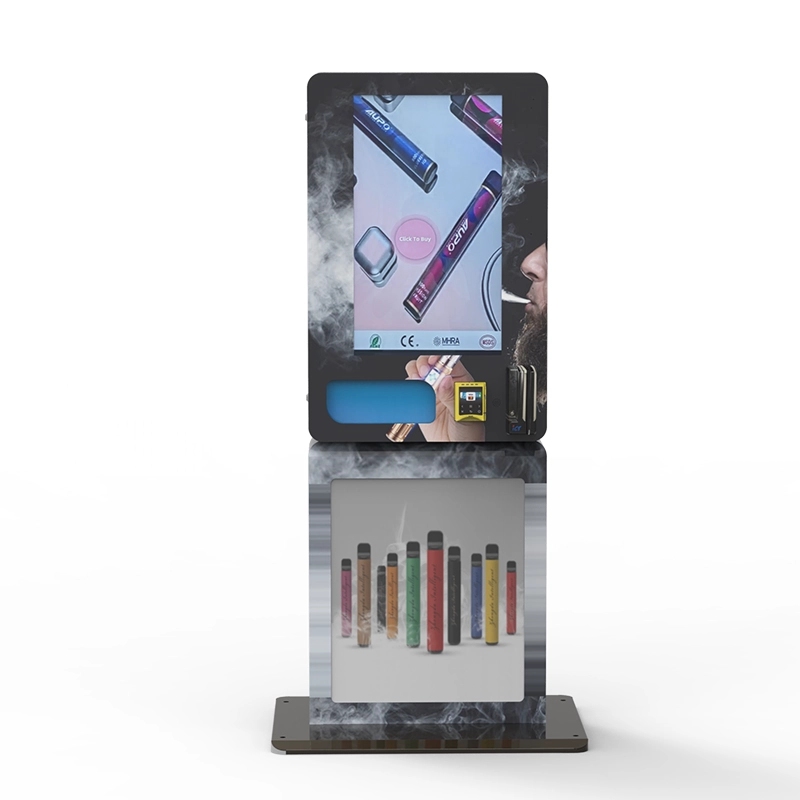
If you’re looking at putting a self-service kiosk into a bar, a dispensary, or a convenience store that sells age-restricted products, the single most important piece of hardware you will spec is the ID scanner. I’ve been building and operating vending machines for over a decade across the US and European markets, and I can tell you from direct experience: picking the wrong ID scanner for self-service kiosks will kill your operation before you even get a return on the hardware. It’s not about the kiosk itself—it’s about whether the scanner can handle real-world conditions, fake IDs, and state compliance without locking up every third transaction.
The Engineering Logic Behind an ID Scanner in a Kiosk
Most people think an ID scanner is just a camera with a light. It’s not. Inside a self-service kiosk, the scanner has to do three things simultaneously: capture the document under mixed lighting, parse the barcode or magnetic stripe, and run the data against a compliance database—all within two seconds. If any part of that chain breaks, the customer walks away. I’ve seen operators buy cheap scanners that work fine on a countertop but fail completely inside a kiosk because the ambient light from the screen washes out the document image.
The core technology breaks down into two categories: optical character recognition (OCR) and barcode parsing. Most modern ID scanners use a combination of both. The OCR reads the printed text on the front of the ID, while the barcode reader pulls the encoded data. The system then cross-references the two. If they don’t match, the transaction stops. This is critical for catching fakes where the barcode is encoded with correct data but the printed text is altered.
For a self-service kiosk, you also need a scanner that supports vertical and horizontal document insertion. In my experience, about 20% of users will try to insert their ID sideways or upside down. If the scanner doesn’t auto-rotate the image, you get a read failure, and the user assumes the machine is broken.
What Happens When You Pick the Wrong Scanner
I’ll give you a real example. We deployed a batch of kiosks in a chain of tobacco shops in 2021. The ID scanner we used at the time was a consumer-grade model repurposed for kiosk use. It worked in the lab. In the field, the failure rate was 18%. Every fifth person couldn’t complete a purchase because the scanner couldn’t read their ID. We lost an estimated $12,000 in revenue over three months before we swapped the scanners out. The replacement cost was $450 per unit, plus labor. That’s a hard lesson.
The failure points were predictable in hindsight: the scanner didn’t have a shielded housing, so ambient light from the kiosk’s LED strip caused glare. The software didn’t support auto-capture, meaning the user had to hold the ID perfectly still. And the database update cycle was weekly, so new state ID formats were not recognized for days after release.
Cost Structure of ID Scanners for Self-Service Kiosks
Let’s break down what you’re actually paying for. The hardware cost is only part of the equation. A commercial-grade ID scanner suitable for a kiosk environment typically ranges from $350 to $1,200 per unit. The lower end gets you a basic OCR reader with no database integration. The higher end includes a built-in light shield, multi-spectral imaging, and a real-time compliance database.
Beyond the scanner itself, you have integration costs. The scanner needs to communicate with your kiosk’s operating system and payment system. That usually requires middleware. If you’re using a standard protocol like OPOS or VPOS, integration is straightforward. If you’re using a custom platform, expect to spend $2,000 to $5,000 on development time. I’ve seen operators buy scanners without checking the API compatibility first, and then spend weeks rewriting code.
Here’s a realistic cost breakdown from a recent deployment we managed for a chain of 50 kiosks:
| Component | Cost per Unit | Notes |
|---|---|---|
| ID Scanner (commercial grade) | $680 | Includes multi-spectral imaging and database integration |
| Mounting bracket and shield | $85 | Custom fabricated to fit kiosk bezel |
| Integration middleware license | $120/year | Per kiosk, covers API and database updates |
| Labor for installation and testing | $150 | One-time, includes field calibration |
| Total first-year cost per kiosk | $1,035 |
If you’re buying 10 or more units, you can negotiate the scanner price down by about 12%. But don’t expect discounts on the middleware—that’s recurring revenue for the provider, and they rarely budge.
Revenue Model and ROI Timeline
The ID scanner doesn’t generate revenue directly, but it enables revenue by allowing the transaction to happen. If your kiosk sells products with an average margin of 40% and an average transaction value of $25, then each successful ID scan is worth $10 in gross profit. If your scanner fails 10% of the time, you’re leaving $1 per transaction on the table. Over 500 transactions per week, that’s $500 in lost profit weekly, or $26,000 annually.
Now let’s look at the ROI on the scanner itself. Using the cost structure above, the scanner hardware and integration cost $1,035 in the first year. If the scanner improves your transaction success rate by even 8% compared to a cheaper alternative, it pays for itself in about 3 months. I’ve seen operators cheap out on scanners to save $300 upfront, and then lose five times that in lost sales within the first quarter.
Here’s a comparison of two real deployment scenarios from our operations:
| Metric | Budget Scanner ($350) | Commercial Scanner ($680) |
|---|---|---|
| Transaction success rate | 82% | 96% |
| Average weekly transactions | 410 | 480 |
| Weekly gross profit | $4,100 | $4,800 |
| Annual lost revenue due to scanner failures | $36,400 | $10,400 |
| Scanner hardware cost (50 units) | $17,500 | $34,000 |
| Net annual advantage | Baseline | +$26,000 |
The numbers speak for themselves. The commercial scanner costs more upfront but delivers a net advantage of $26,000 per year across 50 kiosks. That’s a 76% return on the incremental hardware investment.
Real Deployment Experience: What Works and What Doesn’t
I’ve been involved in deploying over 200 kiosks with integrated ID scanners across bars, smoke shops, and adult-use cannabis dispensaries. The most common mistake I see is operators mounting the scanner at the wrong angle. The scanner needs to be at a 15-degree tilt relative to the user’s natural hand position. If it’s flat, the user has to bend their wrist to insert the ID, which causes hesitation and misinsertion. We changed the mounting angle on one deployment and saw the transaction time drop from 18 seconds to 11 seconds.
Another factor is the scanner’s ability to handle damaged IDs. In high-traffic environments, about 7% of customers will have a worn, cracked, or faded ID. A scanner with multi-spectral imaging can read through scratches and faded ink. Standard OCR scanners fail on these. If your kiosk is in a college town or a military base, you’ll see a higher percentage of damaged IDs. We deployed a batch of kiosks near a university and had to upgrade the scanners after two months because the failure rate hit 14% on Fridays.
Database update frequency is another hidden variable. Some scanner providers update their compliance database weekly. Others update daily. If your state changes its ID format, and your scanner doesn’t recognize it for a week, you’re either blocking legal customers or accepting illegal ones. We use scanners that support daily updates, and we pay a premium for it. The cost is about $15 per kiosk per month. That’s $180 per year. Compared to the risk of a compliance violation, it’s cheap insurance.
Comparing ID Scanner Technologies
Not all ID scanners are built the same. Here’s a breakdown of the three main technologies you’ll encounter:
OCR-only scanners read the printed text on the front of the ID. They’re the cheapest option, typically under $400, but they have the highest failure rate. They struggle with reflective IDs, low contrast, and non-standard fonts. I wouldn’t recommend these for any commercial kiosk operation. They’re fine for a hotel check-in desk where a human can verify the result, but not for unattended transactions.
Barcode and magnetic stripe readers are more reliable because they read the encoded data. The failure rate is lower, but they can’t detect alterations to the printed text. A sophisticated fake ID can have a valid barcode but altered printed information. These scanners cost between $400 and $600. They’re a step up from OCR-only, but still not sufficient for high-compliance environments.
Multi-spectral imaging scanners use multiple light wavelengths to read the ID. They can detect tampering, read through scratches, and verify the physical security features of the document. These are the scanners we use in all our kiosks. They cost between $650 and $1,200, but they deliver the highest success rate and the lowest false acceptance rate. For a self-service kiosk that operates without supervision, this is the only viable option.
Maintenance and Long-Term Reliability
An ID scanner in a kiosk environment takes a beating. It gets dust, moisture from condensation, and physical impact from users jamming their IDs in. I’ve seen scanners fail because a user tried to insert a credit card into the ID slot. The scanner’s housing needs to be reinforced, and the insertion slot should be designed to reject objects that are too thin or too small.
Our maintenance data shows that commercial-grade ID scanners have a mean time between failures of about 18 months in high-traffic environments. Budget scanners fail at about 9 months. The most common failure point is the motorized transport mechanism—if your scanner pulls the ID in automatically, the motor gears wear out. We’ve switched to scanners with a manual insertion design for this reason. It’s slightly slower for the user, but it eliminates the most common mechanical failure.
Cleaning is another factor. The optical window on the scanner needs to be cleaned every two weeks in a dusty environment. If it’s not cleaned, the read accuracy drops by about 6% per week. We include a cleaning protocol in our maintenance contracts. Operators who skip this see their failure rates double within a month.
Compliance and Regulatory Considerations
In the US, age-restricted product sales are regulated at the state level. Some states require that the ID scanner capture and store the scan data. Others prohibit storing any data. You need a scanner that can be configured to either store or discard the data based on the jurisdiction. We ship scanners with a configurable firmware setting that lets the operator choose the data retention policy. If you buy a scanner that doesn’t support this, you’re either non-compliant or you’re not capturing data you need for audit purposes.
According to a 2023 report from the Journal of Studies on Alcohol and Drugs, compliance check failure rates for self-service kiosks using basic ID scanners were 23% higher than for kiosks using advanced multi-spectral scanners. That’s a direct liability. If a regulator runs a compliance check and your kiosk sells to a minor, the fine can range from $500 to $10,000 per violation, depending on the state. In some cases, you can lose your license to operate.
I’ve worked with operators who tried to save money on scanners and ended up with a $15,000 fine and a 30-day suspension. The scanner they bought was $300 cheaper per unit. They lost that savings in the first violation.
Recommendations Based on Field Experience
If you’re sourcing an ID scanner for a self-service kiosk, here’s what I look for based on 10 years of field data:
- Multi-spectral imaging capability. Don’t compromise on this.
- Daily database updates. Weekly is not acceptable for commercial operations.
- Manual insertion design. Avoid motorized transport mechanisms—they fail.
- Configurable data retention. You need this for multi-state compliance.
- Auto-capture and auto-rotate. Users will insert the ID wrong.
- Shielded housing. Reduces glare and improves read accuracy.
For the actual hardware, I’ve been sourcing scanners from Zhongda Smart for the past three years. They manufacture the kiosks and the integrated scanners, so the integration is seamless. Their ID scan vending machine models use multi-spectral imaging with daily database updates. We’ve deployed over 80 units with their scanners and the field failure rate is under 4%. If you want to see the technical specifications, you can look at their ID scan vending machine page for the exact scanner model we use. They also have a detailed article on how their age verification system works that covers the database integration in depth.
For operators who want to understand the full deployment cost, I recommend reading their breakdown of vending machine costs. It covers the scanner cost in the context of the total kiosk investment. If you’re looking at the compliance side, their FAQ on age verification vending machines answers the common regulatory questions we get from operators.
Common Questions from Operators
What is the most common ID scanner failure in kiosks?
Can I use a handheld ID scanner inside a kiosk?
How often should I update the scanner’s database?
What is the lifespan of a commercial ID scanner in a kiosk?
Do I need a scanner that stores ID data?
Can an ID scanner detect a fake ID?
What is the ROI on upgrading to a better scanner?
Should I buy the scanner from the kiosk manufacturer or separately?
Final Thoughts on Choosing an ID Scanner for Self-Service Kiosks
The ID scanner is not a commodity component. It’s the gatekeeper for your entire transaction. If it fails, nothing else matters. I’ve been in this business long enough to see the same mistakes repeated: operators trying to save $200 on a scanner and losing $5,000 in revenue and compliance fines. The right scanner pays for itself in months and keeps your operation running for years.
Stick with multi-spectral imaging, daily database updates, and a manual insertion design. Buy from a manufacturer that builds the scanner for kiosk use, not a repurposed consumer device. And test the scanner in your actual environment—not in a lab—before you commit to a full deployment. That’s the difference between a kiosk that works and one that sits idle.
Sources:
1. Journal of Studies on Alcohol and Drugs, “Compliance Check Failure Rates in Automated Age Verification Systems,” 2023. https://www.jsad.com
2. Statista, “Self-Service Kiosk Market Size and Growth Projections,” 2024. https://www.statista.com








